Overview of Using Cloudpath as TACACS+ Server
Cloudpath Enrollment System is a TACACS+ server which acts as network access control for network devices. TACACS+ provides Authentication, Authorization, and Accounting services for network devices, and specifically provides:
- Centralized authentication and identity for access management to network devices.
- Per-command authorization on network devices.
- Logs for all user-entered commands.
A TACACS+ client can be any device with TACACS+ client support, such as RUCKUS ICX switches, RUCKUS Network Controllers, Cisco switches and routers, and others. All traffic is encrypted. The following figure illustrates the basic flow of device-to-Cloudpath TACACS+ server communication.
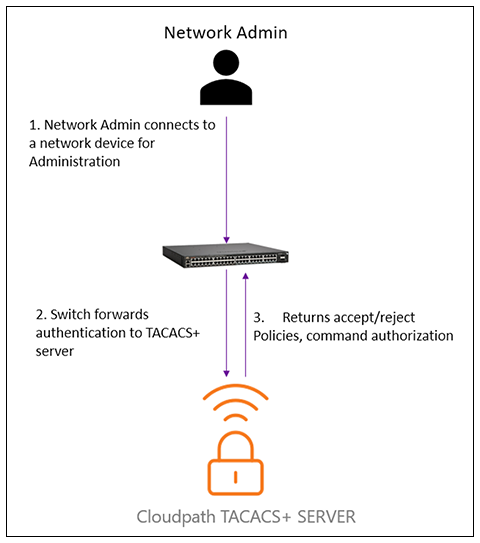
Authentication via TACACS+
The steps for how a user such as a network administrator gets authenticated by the Cloudpath TACACS+ server are:
- The user attempts to gain access to the network device by doing one of the following:
- The user is prompted for a username and password.
- The user enters the correct username and password.
- The device sends a request containing the username and password to the TACACS+ server.
- The username and password are validated in the TACACS server authentication backend or local user repository.
- If both username and password are valid, the user gets authenticated.
Authorization via TACACS+
Two types of TACACS+ authorization are supported:
- Exec authorization. This type of authorization determines the user-privilege level
when
the user is authenticated, as follows:
- A user logs into the network device using Telnet, console, SSH, or a web management interface.
- The user gets authenticated.
- The device communicates with the TACACS+ server to determine the privilege level of the user.
- The TACACS+ server sends a response back to the device that contains an A-V (Attribute-Value) pair with the privilege level of the user.
- The user is granted the specified privilege level.
- Command authorization. With this type of authorization, the switch communicates with
the
TACACS+ server to determine whether the user is authorized to run specific commands,
as
the following process shows:
- A Telnet, console, SSH, or web management interface user who has already been authenticated by the TACACS+server enters a command on the network device.
- The device looks in its configuration file to determine if the command has a privilege level that requires TACACS+ command authorization.
- If the command does have a privilege level that requires authorization, the device consults the TACACS+ server to determine if the user is authorized to run the command.
- If the user is authorized to run the command, the command gets executed.
Accounting via TACACS+
The steps for how accounting works on the TACACS+ server are:
- One of the following events occur on the switch/smartzone device:A user logs into the management interface using Telnet or SSH :
- If the event requires TACACS+ accounting, the device sends a TACACS+ Accounting Start packet to the TACACS+ accounting server, containing information about the event.
- The TACACS+ accounting server acknowledges the Accounting Start packet.
- The TACACS+ accounting server records information about the event.
- When the event is concluded, the device sends an Accounting Stop packet to the TACACS+ accounting server.
- The TACACS+ accounting server acknowledges the Accounting Stop packet.