Licenses Purchased and Licenses Consumed
Consumed Licenses Exceeding Number of Purchased Licenses
The License tab of the Support > Licensing area of the UI is shown in License Information Screen. This is the general-information tab, which includes the "Total Licenses Purchased" and "Total Licenses Consumed" fields. You do not want the total licenses consumed to be greater than the number of licenses purchased. An example of the License tab indicating that the number of consumed licenses does exceed the number of purchased licenses is shown below:
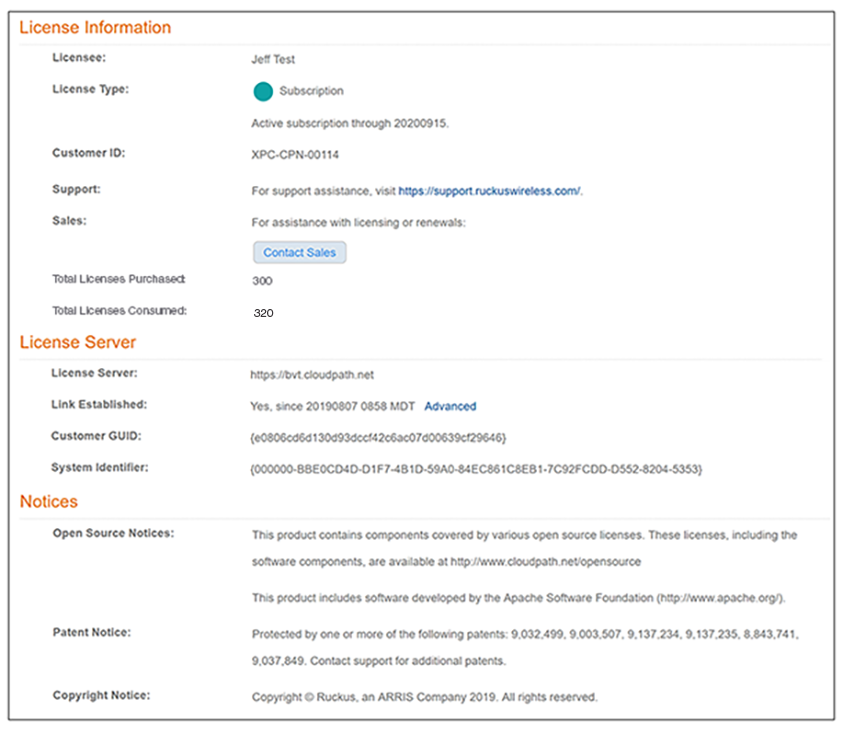
If this situation should occur, you will receive an email notification. An example of this email noticifcation is shown below.

If you receive such an email, you can contact your RUCKUS representative to add more licenses.
How Cloudpath Calculates the Number of Licenses In Use
An understanding of how Cloudpath calculates the total licenses being consumed is important if you wish to limit your consumed licenses as much as possible.
To help illustrate how Cloudpath calculates the number of licenses being used, an example screen shot of the Support > Licensing > Details tab portion of the UI is shown below.
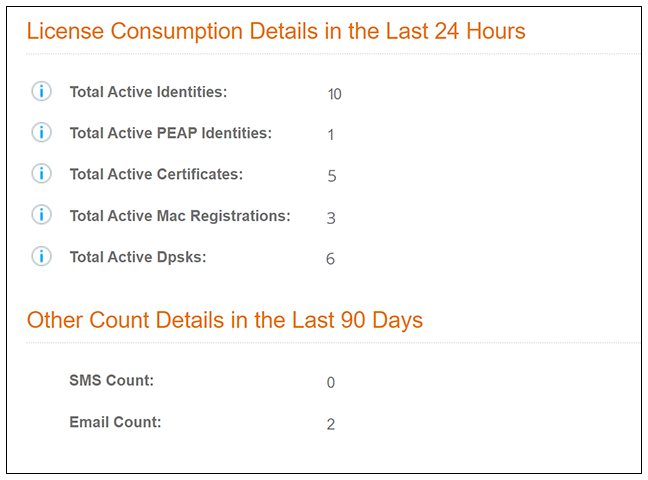
Rules that Cloudpath uses to calculate the "License Consumption Details" shown in the screen above are:
- Licenses are computed every 24 hours.
- Any registration (such as Mac reg, certificate, DPSKs) that is tied to a user enrollment in Cloudpath to onboard a device will count as one user license. A user encollment refers to a user going through a workflow and authenticating to an authentication server such as LDAP, OAUTH, SAML, and so on. This type of enrollment is part of the "Total Active Identities" shown in the screen above.
- If the registration is not tied to a user enrollment using an authentication server, then any registration will count as one user license. Examples include Active Directory GPO push, MDM integration enrollment (SCEP), and IP Phones in a MAC registration list.
- Each active user consumes one license, no matter how many devices are linked to a specific user account. For example, if a user onboards several devices via a workflow, the user can use DPSKs, certificates, MAC registrations, and so on, and still only one license is consumed for this user.
- Each active device where no user is linked to that device also consumes one license.
- DPSK licenses are consumed only when the device uses the DPSK. (A user needs to input the DPSK into the device and connect to the Wi-Fi for the device to consume the DPSK.) For example, if a DPSK pool contains 100 licenses, but none of these licenses are being used, then zero licenses are consumed.
- If a certificate/DPSK/Mac-auth is revoked or expires, the license goes back to the license pool. However, the new license counts are refreshed only after the nightly license-computing routine is run. For information about data cleanups, refer to Data Cleanup.
- The Details tab in Licensing Information Page -
Details Tab Example contains the following categories of license consumption
details:
- Total Active Identities
- Total Active PEAP Identities
- Total Active Certificates
- Total Active Mac Registrations
- Total Active Dpsks
The numbers shown in the Details tab of the previous screen are just examples. If those were numbers from an actual Cloudpath system, the sum of the numbers from those five categories should equal the the number for "Total Licenses Consumed" in the License tab of the Support > Licensing portion of the UI.