RADIUS Server
View and manage the onboard RADIUS server.
- RADIUS Server Status - View status, settings, and certificate information, generate
a CSR, or upload a certificate. You can also download RADIUS server certificates and
log files or export onboard CA information to be used to set up an external RADIUS
server.
- Connection Tracking - Enabled by default on new systems, Connection Tracking displays the current device connections on the page. RADIUS Accounting must be enabled on your wireless LAN controller. See the Integration with Ruckus Controllers guide on the Support tab for more information.
- CoA - Enable CoA to send Change of Authorization disconnect messages (DMs) from Cloudapth to the switch or wireless LAN controller. You can send disconnects from the page, or via an enrollment Revoke. See the Onboard RADIUS Server CoA guide on the Support tab for more information.
- Policies - View all policies for the onboard RADIUS server, including those assigned by certificate templates, eduroam configuration, and MAC registration policies.
- Clients - View all RADIUS allowed to call into the RADIUS server, including any eduroam clients.
- RADIUS Server and eduroam - Configure a eduroam federation server to interact with the onboard RADIUS server.
- Attributes - Define the RADIUS attributes that will be visible in the system. These attributes, which are included in the Access-Accept/Reject reply from the RADIUS server, can be added to the certificate template, MAC registration, and eduroam configuration.
- External - Download a zip file, which provides the information and CA certificate needed for an external RADIUS server.
- Open Access - Configure open access for a specific SSID, for a specified time-period
for short term usage.
Note: We recommend using Open Access in a limited, or test environment. SSIDs configured for Open Access are not secure.
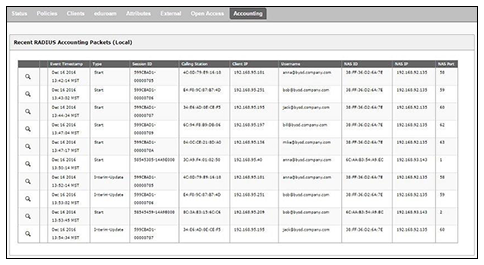
- RADIUS Accounting - If your wireless LAN controller is configured to support RADIUS accounting, and if Connection Tracking is enabled, the Accounting tab displays RADIUS accounting packets local to the Cloudpath server. See the Integration with Ruckus Controllers guide on the Support tab for more information.