Troubleshooting the Cloudpath Passpoint Configuration
This section describes issues to consider when testing or troubleshooting Cloudpath servers that have been configured for Passpoint.
Hotspot 2.0 Root CA
Your Hotspot 2.0 root CA must be issued by one of the CAs authorized by Wi-Fi Alliance.
http://www.wi-fi.org/certification/certificate-authority-vendors.
Each OSU Server has a certificate signed by a Certificate Authority whose root certificate is trusted by the connection manager of the mobile device. Passpoint Release 2 mobile devices possess the Trust Root certificates from all of the authorized Trust Root CAs. As such, mobile devices can properly validate an OSU server certificate and its metadata (friendly name and icon). This insures the integrity and security of the OSU process
Icon Embedded in the Certificate
The web server certificate for your Cloudpath system must use a Hotspot 2.0 WWW certificate with an embedded Common Language icon.
Use PNG-encoded icon images because the Hotspot 2.0 Release 2 specification mandates all mobile devices accept this format. Image sizes up to a maximum of 65,535 bytes are permitted, but we recommend using images having a small file size to conserve air time when delivering the image to a mobile device.
The exact same image file provided in the CSR is also provided to the Hotspot Operator. This is because the CA puts a hash of the icon file in the OSU server certificate and the mobile device computes the hash of the icon delivered by a Hotspot Operator's AP—if the hashes do not match exactly, the mobile device aborts the OSU process.
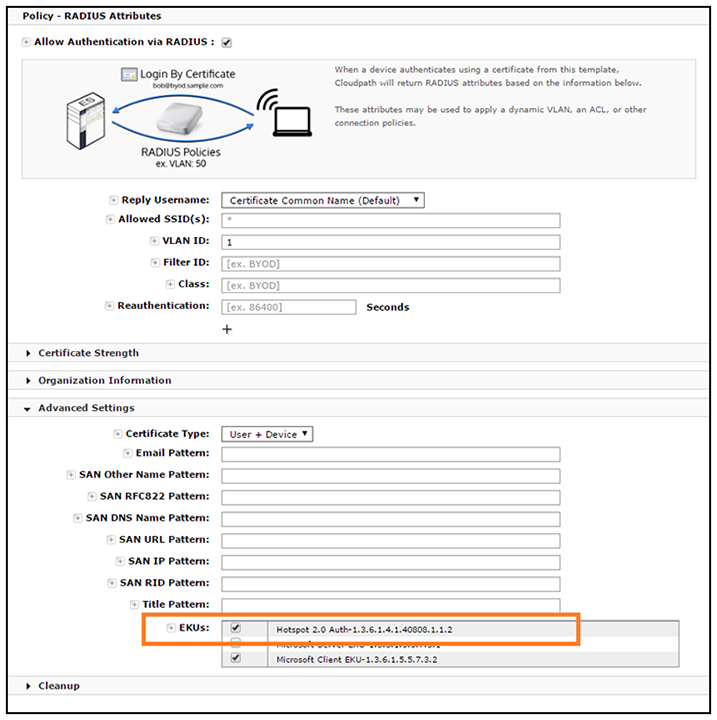
Certificate Template EKU
Be sure that the certificate template in your passpoint configuration has the Hotspot 2.0 Auth- 1.3.6.1.4.1.40808.1.1.2 EKU setting checked.