SNMPv3

Complete the following steps if your network uses SNMPv3.

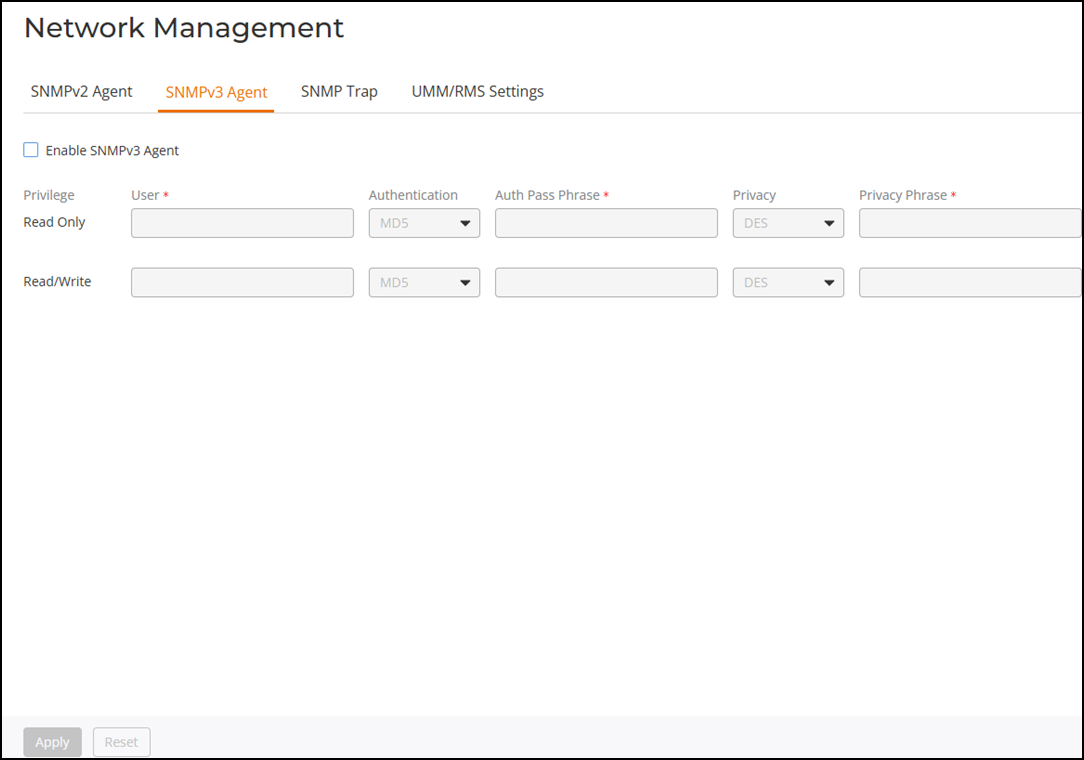
  1. From the main menu, select Administration > Network Management.
    The Network Management page is displayed.
  2. On the SNMPv3 Agent tab, select the Enable SNMPv3 Agent checkbox.
  3. Enter the following information for both the Read Only and Read/Write privileges:
    • User: Enter a user name between 1 and 31 characters.
    • Authentication: Select one from the following authentication methods:
      • MD5 (Message-Digest algorithm 5): Message hash function with 128-bit output (Default).
      • SHA (Secure Hash Algorithm): Message hash function with 160-bit output.
    • Auth Pass Phrase: Enter a passphrase between 8 and 32 characters in length.
    • Privacy: Select one from the following options: DES, AES, or None.
      • DES (Data Encryption Standard) uses data block cipher.
      • AES (Advanced Encryption Standard) uses data block cipher.
      • None: No privacy passphrase is required.
      • Privacy Phrase: If DES or AES is selected, enter a privacy phrase between 8 and 32 characters in length.
  4. Click Apply to save your changes.

SNMPv3 Agent