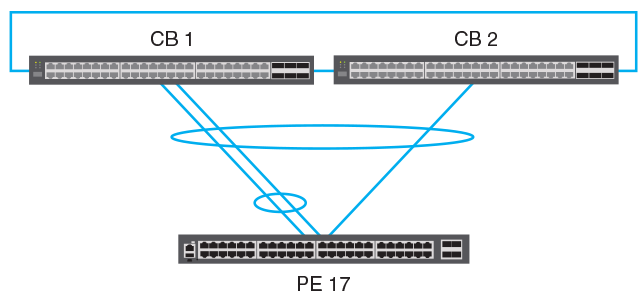
Topologies Not Supported by Campus Fabric
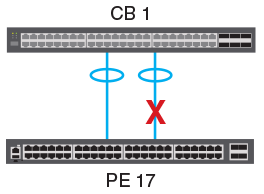
If you attempt to configure a redundant link between a CB unit and a PE unit or between
two PE units in a chain, the configuration is error-disabled because the second link
creates a loop. Correct the problem by adding the second link to a single SPX LAG
using the
multi-spx-lag command.
The following figures illustrate redundant link configurations.
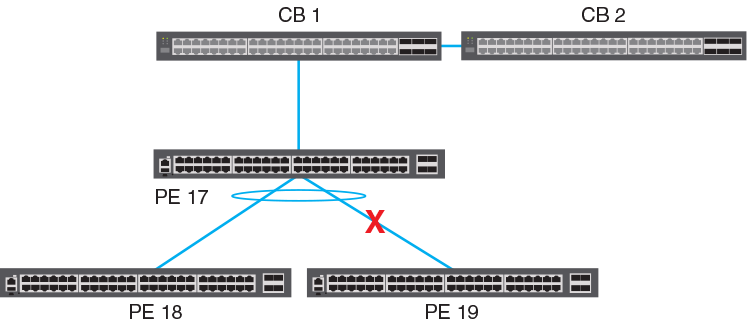
A PE unit can have only two SPX ports or LAGs. As a result, a PE unit cannot have two PE units directly attached downstream at the same level of the SPX chain. In the following figure, whichever unit, SPX 18 or SPX 19, joins first "wins" the connection. When the remaining PE candidate attempts to join, the system displays a warning message similar to this one:
SPX join error: Has 17/2/1 -- 18/2/3 (age=0), recv 17/2/1 -- ?/2/3, Transit PE 17 has two cscd-links
When this happens, remove the second unit; otherwise, a communication failure may occur.
Unsupported LAG Configurations
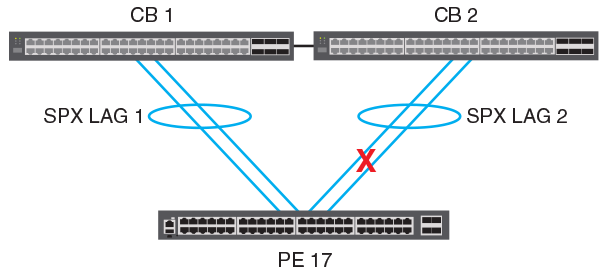
A PE unit cannot have two different LAG connections to two units in the CB stack. (That is, a single PE unit cannot form a PE ring.) LAG 2 in the following figure will be blocked (error-disabled) in a Campus Fabric implementation. A single LAG connection from the two CB units to the PE unit is supported as shown in Supported CB-PE LAG topologies.
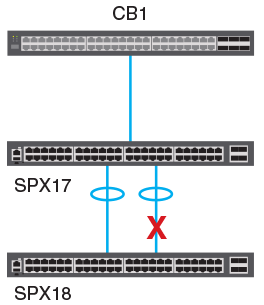
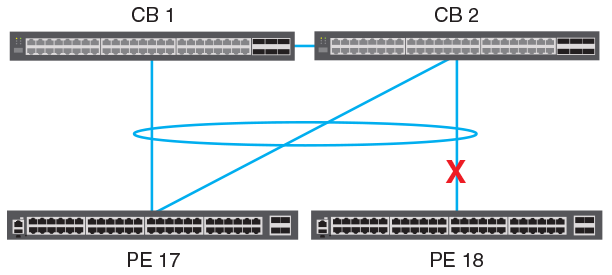
A cascade LAG cannot be configured between the CB and two different PE units. In the following figure, whichever unit, SPX 17 or SPX 18, joins first "wins" the connection. When the remaining PE candidate attempts to join, the system displays a warning message similar to this one:
SPX join error: both PE 17 (MAC=1234.5678.ab00) and new PE (MAC=1234.5678.cd00) link to 1/1/20: invalid topology
When this happens, remove the second unit; otherwise, a communication failure may occur.
A PE unit cannot be connected to two different units through two different LAGs with overlapping members as shown in the following figure.