Converting 1-Gbps SPX Links on Downstream PEs to 10-Gbps Links
- Most ICX 7150 devices require a license for ports that will be used for 10-Gbps connections.
The exception is the ICX 7150-48ZP model, which is shipped with two 10-Gbps ports
but requires a license for any additional 10-Gbps connections. Refer to the
RUCKUS FastIron Software Licensing Guide for information on installing ICX 7150 licenses.
Note: ICX 7150-C08P devices have no 10-Gbps-capable ports.
- ICX 7250 devices require a license for all ports that will be used for 10-Gbps connections. Refer to the RUCKUS FastIron Software Licensing Guide for information on licenses and downloading them.
- Stacking must be disabled on ICX 7150 and ICX 7250 units before they can be connected as PE units.
SPX links and LAGs do not allow speed negotiation. However, an attached ICX 7150 or ICX 7250 discoverable as a PE unit is allowed to have a 1-Gbps (1000-full duplex) configuration. For the attached unit to join and operate successfully as a PE unit over a 10-Gbps SPX link or LAG, the 1-Gbps link between it and an upstream device must be converted to 10 Gbps (see the example in the following figure) while the unit is still in Provisional-PE mode, before it is controlled by the CB.
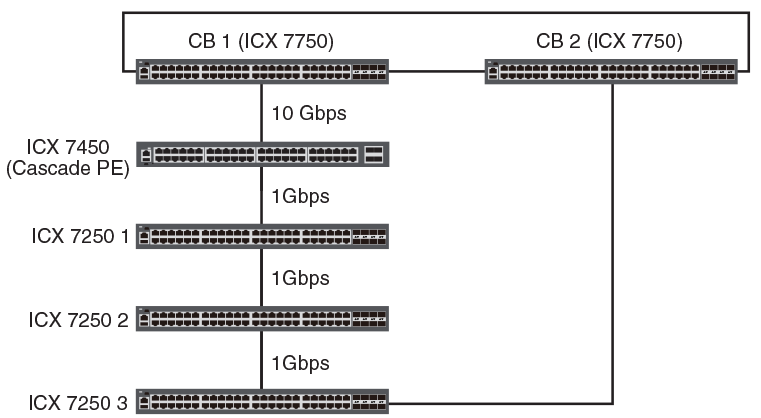
Perform these steps to convert a 1-Gbps SPX ring connection to a 10-Gbps SPX link or LAG between an ICX 7150 or ICX 7250 device and an active PE unit.
no multi-spx port
and
no multi-spx lag commands can be used only to break PE rings. The commands cannot be used to break
a PE chain. If you are working with a PE chain, use the manual procedure described
in
Converting attached PE candidate speed by physically disconnecting the units.
- Disable the SPX ports on both side of the link or LAG using the
no multi-spx portorno multi-spx lagcommand. - On the affected PE candidates, change the 1-Gbps optic to the desired 10-Gbps optic.
- From the console, enter the
speed-duplex 10g-fullcommand for all affected ports, and specify appropriate media to change the speed of the upstream port or planned multiple-port LAG connection from 1 Gbps to 10 Gbps.device(config)# interface ethernet 18/2/1 device(config-if-pe-e10000-18/2/1)# enable device(config-if-pe-e10000-18/2/1)# speed-duplex 10g-full device(config-if-pe-e10000-18/2/1)# exit device(config)# interface ethernet 18/2/3 device(config-if-pe-e10000-18/2/3)# enable device(config-if-pe-e10000-18/2/3)# speed-duplex 10g-full device(config-if-pe-e10000-18/2/3)# exit device(config)# interface ethernet 19/2/1 device(config-if-pe-e10000-19/2/1)# enable device(config-if-pe-e10000-19/2/1)# speed-duplex 10g-full device(config-if-pe-e10000-19/2/1)# exit device(config)# interface ethernet 19/2/3 device(config-if-pe-e10000-19/2/3)# enable device(config-if-pe-e10000-19/2/3)# speed-duplex 10g-full device(config-if-pe-e10000-19/2/3)# exit
- Reconfigure all affected ports as SPX ports or SPX LAGs.
- Reconfigure the connecting SPX port or LAG of any additional downstream ICX 7150 or ICX 7250 devices in the same way, changing the 1-Gbps SPX port or LAG to a 10-Gbps SPX port or LAG connection.