IoT AP Overview
The RUCKUS IoT Controller displays the IoT AP hierarchy (Domain, Zone, Group) information, which is derived from the IoT AP and SmartZone connection. Therefore, it is important to ensure that the IoT AP is running the latest appropriate IoT firmware.
An IoT Access Point discovers the RUCKUS IoT Controller by using Option 43 or the RUCKUS Command Line Interface (RKSCLI). RKSCLI mode is not encouraged, and must be used only if a DHCP server is not present.
DHCP Option 43
The IoT Access Point supports Option 43 with the following suboptions:
- Suboption 21: Used to configure a RUCKUS IoT Controller IPv4 address or FQDN (mandatory)
- Suboption 22: Used to set the control VLAN for IoT Control/Data traffic (optional)
Option 43 supports both binary and ASCII formats. The IoT Access Point bootup process checks for Option 43 and suboptions 06, 21 and 22. Once the application receives this information, it uses the information to connect to the controller over the Pubsub channel.
You can use the DHCP Option 43 sub-option code 06 to set the SCG/vSZ/SZ IP address in the format SubCode /Length/ (Value In Hex). For example : If the IP address is 10.24.123.4, then the hex string is as follows 06 0b 31302e32342e3132332e34.
The DHCP Option 43 sub-option code 21 and 22 is used to set the RUCKUS IoT Controller IP address.
For Example, Windows DHCP Configuration with Sub-option 21 and 22:
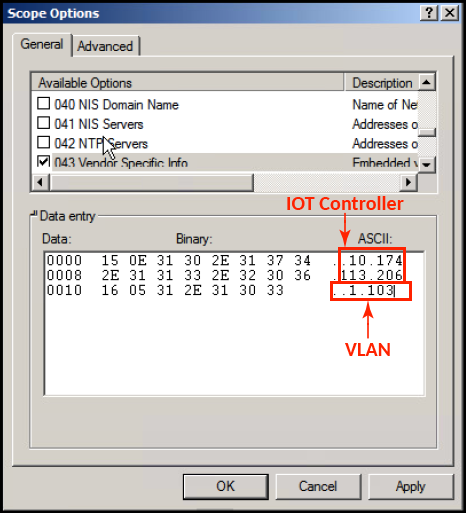
Linux DHCP option 43, sub option 21 configuration is as follows:
dhcp_opt43 configuration subopt 22- "vlan_mode.vlan_id"
- #option RKUS.iotvlan-address "0.4" -enables onlink VLAN
- #option RKUS.iotvlan-address "1.4" -enables offlink VLAN
• Offlink VLAN configuration is used when the IOT Gateway/AP and IOT controller are in different networks.
• Onlink VLAN configuration is used when the IOT Gateway/AP and IOT controller are in same network.
RUCKUS Command Line Interface
The set
iotg-mqtt-brokeripRUCKUS-IoT-Controller-IP-address command can be used to discover the RUCKUS IoT Controller.
USB Power
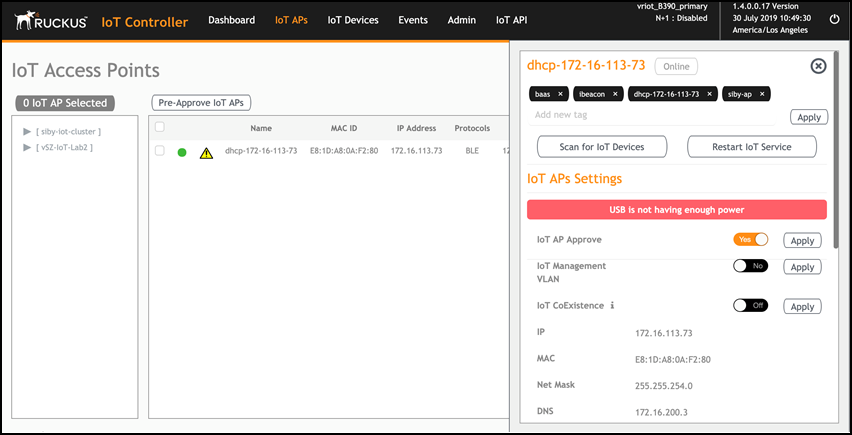
If an AP does not have enough USB power, it is displayed in the IoT APs page with the following message: USB is not having enough power.