ICX 7250 Stacking Topologies
Up to 12 ICX 7250-24, ICX 7250-24P, ICX 7250-48, or ICX 7250-48P units can be connected in a linear or ring topology. Any of these models can be mixed in the same stack. Stacking ports are located on the front panel as shown in the following figures.
From one to four 10-Gbps ports (from eight available 10-Gbps ports) can be used for stacking on the ICX 7250. All stacking ports must have an active license installed to be properly configured. Active stacking ports can be configured in one of two sets of ports on the front panel; however, stacking ports cannot be mixed between the two sets of ports because of operational constraints. Available ports are numbered 1/2/1 through 1/2/8 as shown in the following figure.
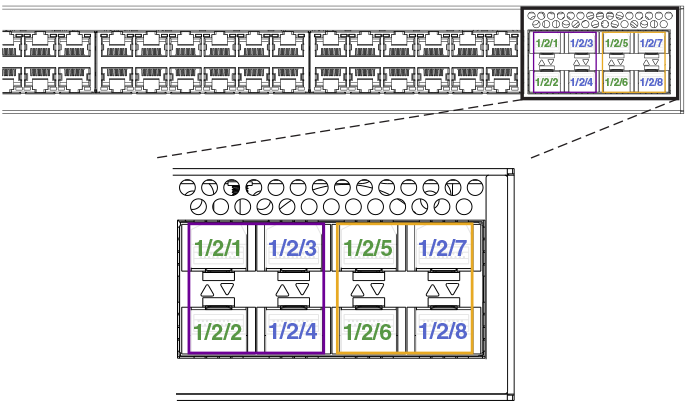
The following figures show ICX 7250 units connected in a linear stack and a ring stack.


The following figure depicts a two-unit stack linear-topology trunk. All ICX 7250 models support this type of trunk, which improves redundancy and bandwidth. For more information, refer to Configuring Two-unit Stack Linear-topology Trunks.