SDVoE Configuration Options
You can configure SDVoE using one of the following methods:
Enabling SDVoE for an IGMP-snooping-enabled VLAN using the multicast sdvoe Command
Consider the following when using this method:
- Edge ports should be manually configured.
- Fast-leave-v2 on edge ports should be manually configured.
- If using IGMPv3, tracking should be manually configured.
The following illustration shows a network topology where edge ports are configured on Switch 1 and Switch 2 so that fast leave can be enabled only on these ports. IGMP snooping is enabled in passive mode for Switch 1 and Switch 2. SDVoE is configured for multicast packets in the VLAN. The Querier switch does not have any edge ports configured. IGMP snooping is enabled in active mode for the Querier switch so that queries are generated.
Configuration Example: Enabling SDVoE using the multicast sdvoe Command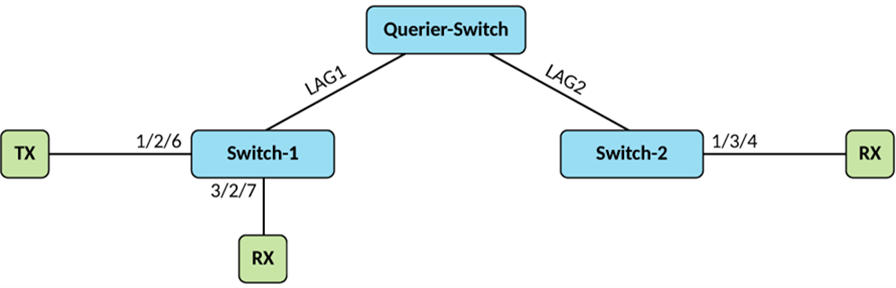
The following example enables IGMP snooping and SDVoE on all switches, and fast-leave on Swtich1 and Switch2.
Switch 1:
Switch-1# configure terminal
Switch-1(config)# vlan 11
Switch-1(config-vlan-11)# tagged ethernet 1/2/6 ethernet 3/2/7 lag 1
Switch-1(config-vlan-11)# multicast passive
Switch-1(config-vlan-11)# multicast fast-leave-v2 edge-ports
Switch-1(config-vlan-11)# multicast sdvoe

Querier:
Querier# configure terminal
Querier(config)# vlan 11
Querier(config-vlan-11)# tagged lag 1 lag 2
Querier(config-vlan-11)# multicast active
Querier(config-vlan-11)# multicast querier-address 3.3.3.3
Querier(config-vlan-11)# multicast sdvoe

Switch-2:
Switch-2# configure terminal
Switch-2(config)# vlan 11
Switch-2(config-vlan-11)# tagged ethernet 1/3/4 lag 2
Switch-2(config-vlan-11)# multicast passive
Switch-2(config-vlan-11)# multicast fast-leave-v2 edge-ports
Switch-2(config-vlan-11)# multicast sdvoe
Enabling SDVoE for an IGMP-snooping-enabled VLAN where Edge-ports are Automatically Created
Consider the following when using this method:
- Edge-ports are automatically created.
- Fast leave is not supported.
- Tracking is automatically enabled for both IGMPv2 and IGMPv3.
- This method is not interoperable with other vendor switches.
The following illustration shows a network topology where edge ports are automatically configured on Switch 1 and Switch 2. Tracking for IGMPv2 and IGMPv3 is automatically enabled. Multicast passive, dynamic edge port and IGMPv2 and IGMPv3 client tracking is configured for Switch 1 and Switch 2. Multicast active, dynamic edge port and IGMPv2 and IGMPv3 client tracking is configured for the Querier switch. Passive neighbors can dynamically identify edge and non –edge ports. Receiver client tracking is enabled across the switches for all reports. In this network topology, any VLAN can be configured as the Querier switch.
Configuration Example: Enabling SDVoE where Edge-ports are Automatically Created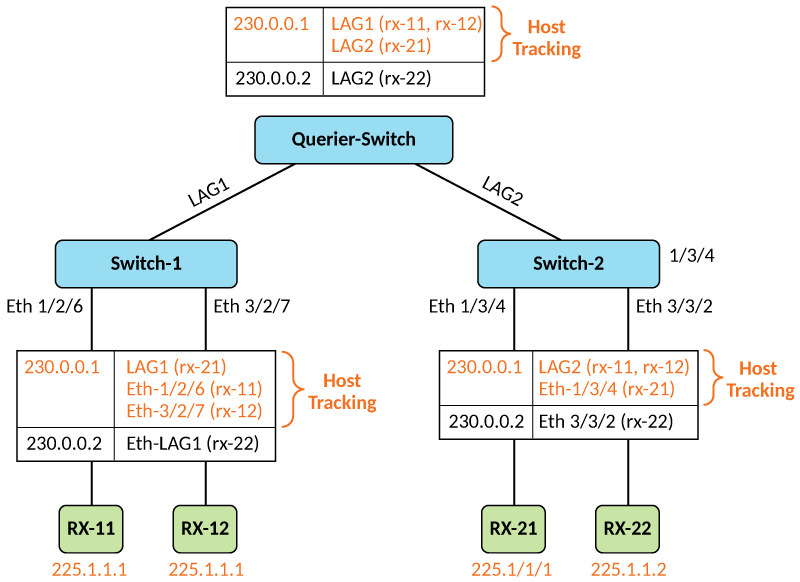
Switch 1:
Switch-1# configure terminal
Switch-1(config)# vlan 11
Switch-1(config-vlan-11)# tagged ethernet 1/2/6 ethernet 3/2/7 lag 1
Switch-1(config-vlan-11)# multicast sdvoe auto-edge-port-track-passive

Querier:

Querier-1# configure terminal
Querier(config)# vlan 11
Querier(config-vlan-11)# tagged lag 1 lag 2
Querier(config-vlan-11)# multicast sdvoe auto-edge-port-track-act
Querier(config-vlan-11)# multicast querier-address 3.3.3.3


Switch-2:
Switch-2# configure terminal
Switch-2(config)# vlan 11
Switch-2(config-vlan-11)# tagged ethernet 1/3/4 ethernet 3/3/2 lag 2
Switch-2(config-vlan-11)# multicast sdvoe auto-edge-port-track-passive