Enabling Authentication in the MQTT Broker
The current implementation of the
controller needs authentication to the MQTT Broker.
Note: RUCKUS recommends that you do not
start the Mosquitto MQTT broker by user root. If you start Mosquitto MQTT broker
by
user root or with sudo, it will result in an incorrect start-up environment or
other
error.
- Startup MQTT broker with security enabled.
- Create a mosquitto configuration file, mosquitto.conf. Refer to the examples below.
- According to the pskfile configuration of mosquitto.conf, you must create another pskfile to store the authentication pre-shared key. The format is <username>:<password phrase>. The password phrase is converted into hex representation. Here is an example for the pskfile:
- After you install the mosquitto MQTT broker, you can start it up by the following command:
- After starting an MQTT
subscriber, you can start another MQTT subscriber to connect to the MQTT broker
using unauthenticated port 1883 or authenticated port 8883.
- Here is an example to connect to the MQTT broker with unauthenticated version:
- Here is an example to connect to the MQTT broker using an authenticated security channel:
You can find the difference between the unauthenticated and authenticated version of the mosquitto_sub function, where the psk-identity and psk attribute is connected to MQTT broker using the port number 8883. - Use the following information to
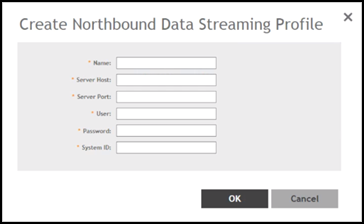
create or configure the MQTT connection profile :
- MQTT server name.
- MQTT server host / IP address.
- MQTT server port number.
- System ID—The backend system collects data from multiple controllers. The system identifier is used to distinguish the data source.
- User credentials of login name and password.
In the authenticated mode of SCI profile, you must provide the user name and password for TLSv1.2 with pre-shared key exchange standard as shown in the following figure.The SCI profile setting is used for allowing the controller to get the MQTT connection information. For example: IP address, port, or user credential. It does not mean that you must have a SCI setup to receive the GPB streaming data.
- Save the SCI profile.
- Configure the Northbound data streaming as explained in the following section.