Configuring Palo Alto Firewall and Web Filters
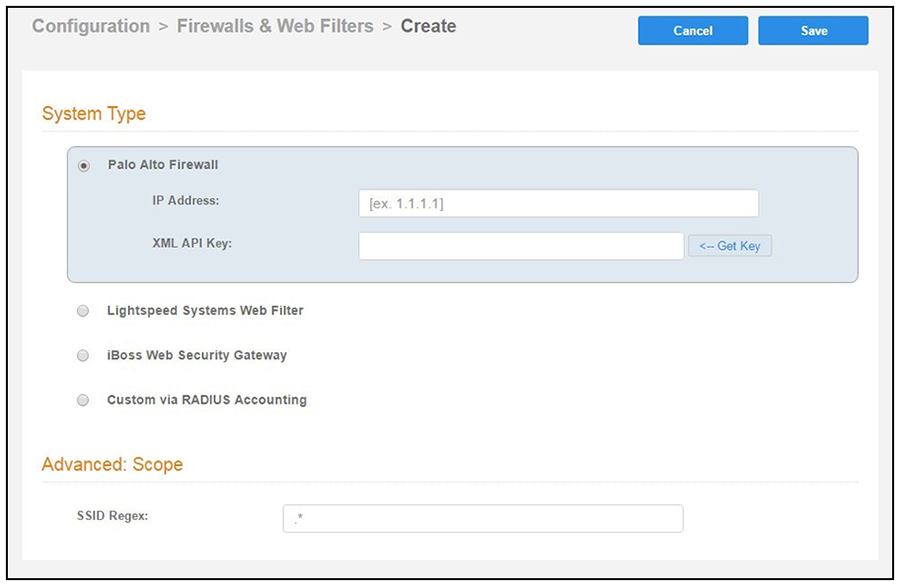
- Navigate to .
- Select Palo Alto Firewall.
- Enter the management IP address of the Palo Alto Networks® system.
- Click Get Key.
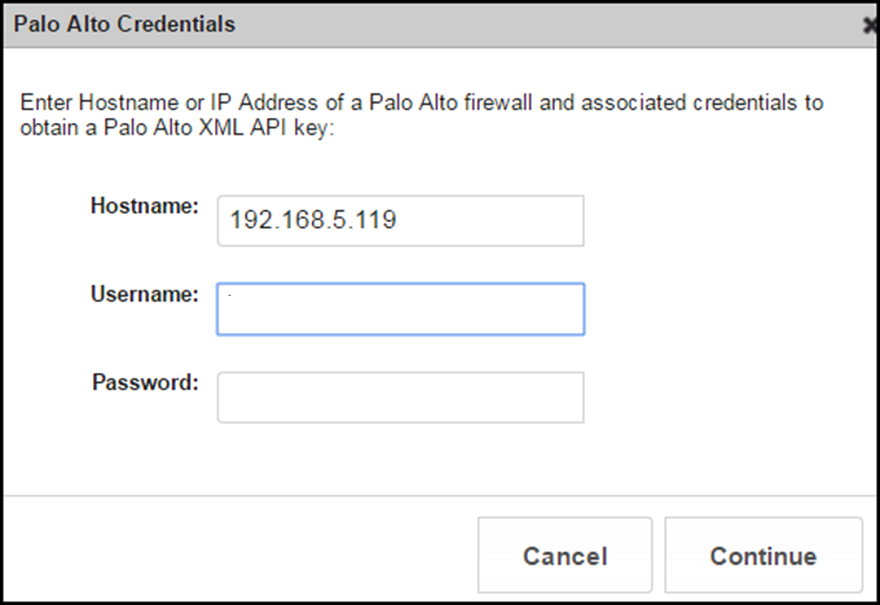
- In the Palo Alto Credentials popup, enter:
- Hostname or IP address of the Palo Alto Networks® firewall.
- Palo Alto Networks® administrator username.
- Palo Alto Networks® administrator password.
The API key is generated by the system and displayed. This is the API key the Cloudpath system will use to communicate with the firewall. - User ID Mapping Timeout (Minutes) is optional. You can customize this value to set the maximum time period. The Palo Alto Networks® firewall is requested to consider User ID mapping values sent by Cloudpath for that duration as valid inputs, without additional updates. The default timeout value is 6 hours.
- Scope is optional. If you want only information from a specific SSID to be forwarded to the Palo Alto Networks® firewall (or other specified web filters), enter it in the SSID Regex field. In the NAS-ID Regex field, enter a regular expression to specify the NAS Identifier(s) that will trigger RADIUS Accounting data forwarding to this external system. Data will only be forwarded if all specified NAS Identifiers match the connected network.