Regenerating SSH Host Keys
You can generate the Secure Shell Protocol
(SSH) host keys from the Cloudpath web interface and CLI terminal.
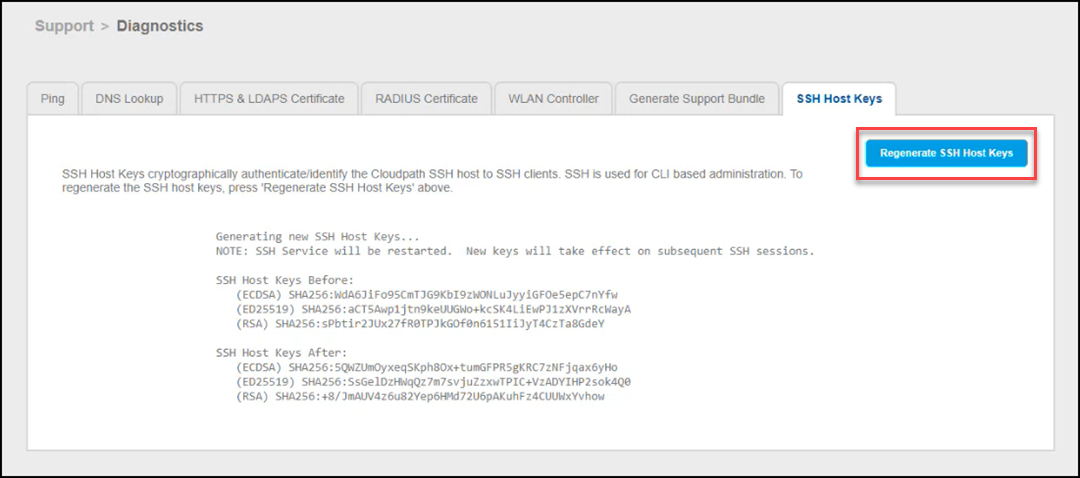
- From the Cloudpath Enrollment
System navigation bar, go to .The Diagnostics page is displayed.
- Select the SSH Host
Keys tab.The existing SSH Host Keys and the status is displayed.
- Click Regenerate SSH Host Keys.
-
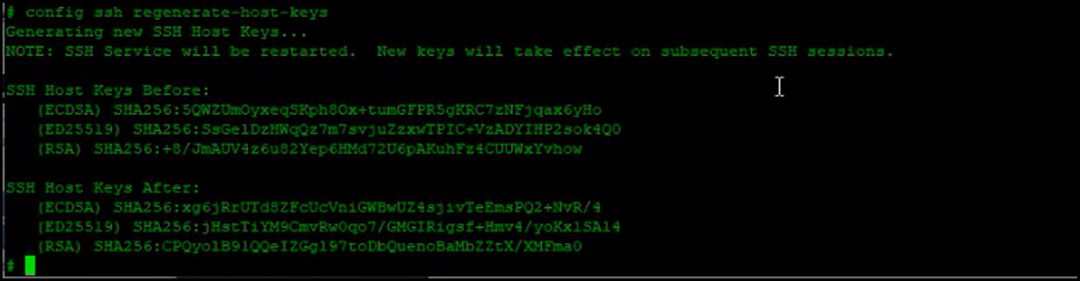
Complete the following steps to manually regenerate the SSH host keys using the Command Line Interface (CLI) of Cloudpath using a terminal program like PuTTY or similar
Note: To access this CLI, you will need the service password, which is configured during the initial installation of the VM instance. - Start an SSH session by using valid credentials.
- Enter the
config ssh
                     regenerate-host-keys
command. - (Optional) Use the
ssh display-host-keyscommand to display the SSH host keys.