How to Add Facebook Authentication to the Workflow
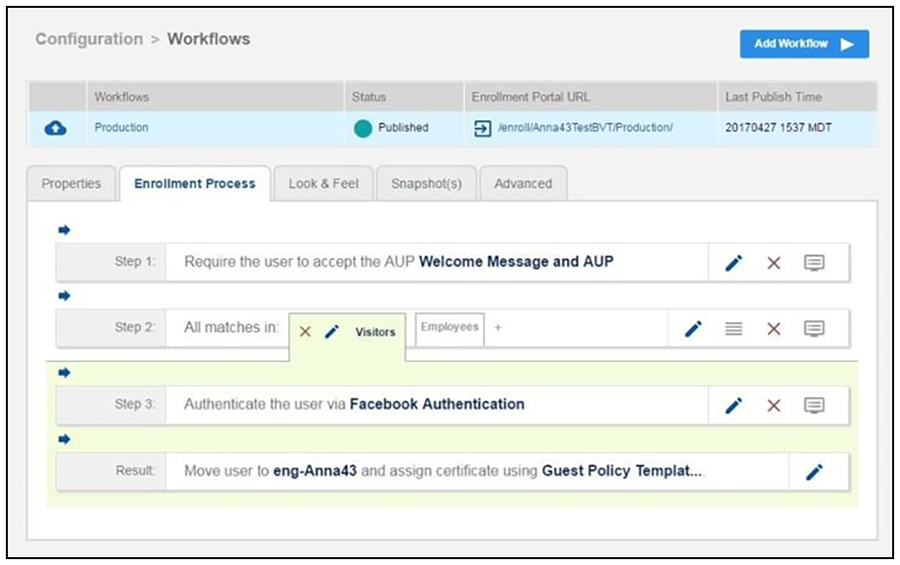
- Create an enrollment workflow for third-party authentication.
- Add an enrollment step that prompts the user to authenticate through a third-party source.
- Select
Create a new configuration.
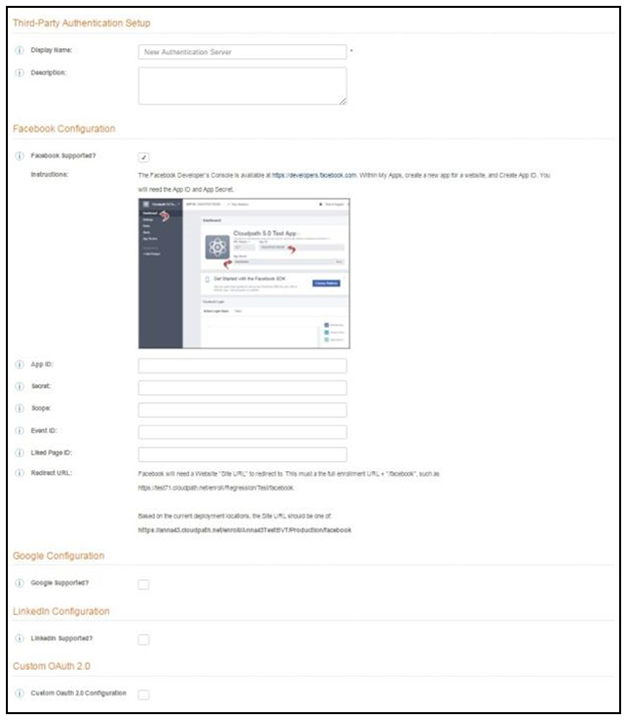
The Third-Party Authentication Setup page allows you to specify which third-party sources are allowed as well as API information related to those sources.
- Enter the Name and Description of this configuration.
- In the Facebook Configuration section, check the
Facebook Supported? box and complete the following fields:
- App ID - The App ID from the Facebook application you just created.
- Secret - The App Secret from the Facebook application you just created.
- Optional settings:
- Scope - A comma separated list of permission names that allows the application to read or write additional data (such as email or user_group) from the Facebook application. If scope is left blank, you can only obtain the Facebook profile ID, URL, and Name.
- Event ID and Liked Page ID - Allows the application to provide additional information about the user. The Scope must include user_likes to use Liked Page ID, and user_events to use Event ID. Adding a user_event (or user_likes) in the Scope allows you to create a filter in the workflow based on whether a user is in the user_event (or user_likes) group. See the Identity Information in the Enrollment Record to view the User Groups.
- Click Save. The Facebook authentication step is added to your enrollment workflow.