Configuring Hotspot 2.0 Release 1 Wi-Fi Operator Profile
A Wi-Fi operator profile is required for Hotspot 2.0 Release 1.
- Navigate to Configuration > Services & Profiles > Hotspots & Portals, then click the Hotspot 2.0 tab.
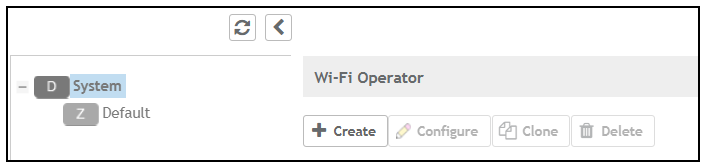
- Be sure that "System" is highlighted:
- Under "WiFi Operator," click Create.
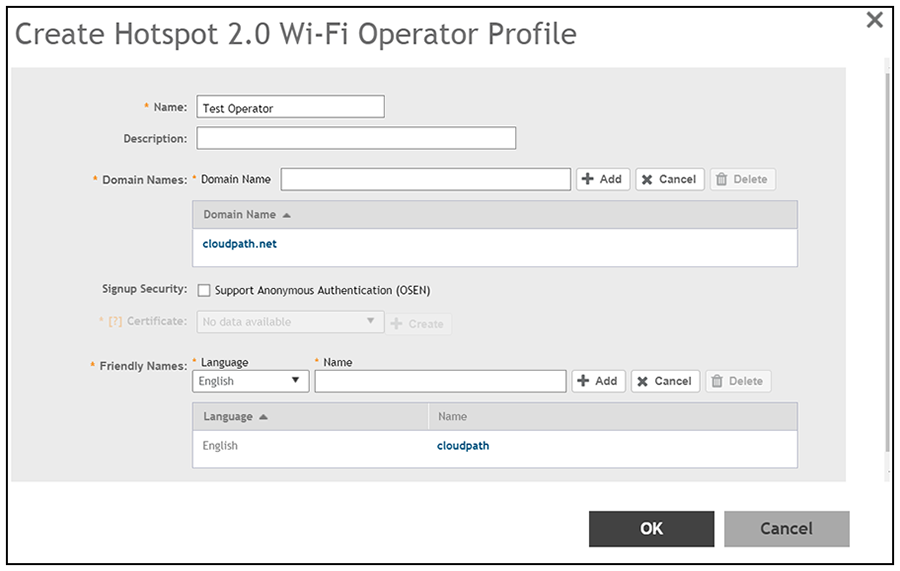
- In the Name field, enter a descriptive name of your choice.
- In the Domain Name field, enter the domain name of your Cloudpath system, then click Add. You can repeat this process to add multiple domain names.
- For Friendly Names, select a Language, then enter the Friendly Name for the Cloudpath
system and click
Add. You can enter multiple languages for the same Friendly Name.
- Click OK.