Interpreting Port-side LEDs
After you install the network cables, you can observe certain LEDs to determine if the network connections are functioning properly. The tables in this section outline the state of each LED, the status of the hardware, and any recommended action.
Port-side LEDs of ICX 7150-C12P and ICX 7150-C12P-ES
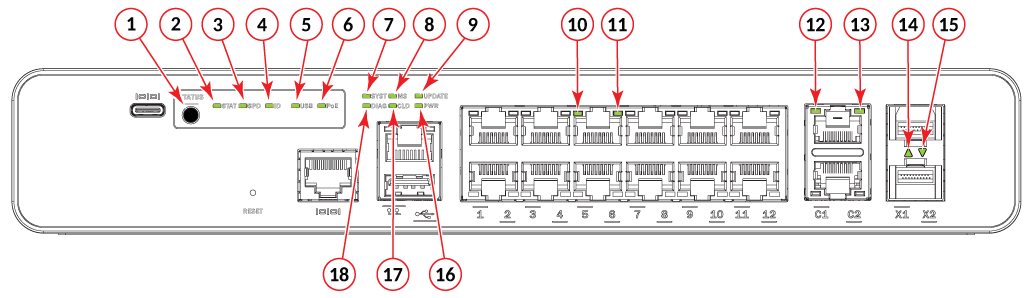
- Port status mode selection button
- Port link status mode LED
- Port speed status mode LED
- Member ID status mode LED
- USB status mode LED
- PoE status mode LED
- System Status LED
- Master/Slave status LED
- Software update status LED
- RJ-45 port 5 RX/TX activity LED (if blinking indicates RX/TX activity)
- PoE LED
- RJ-45 uplink port C1 status LED
- RJ-45 uplink port C1 RX/TX activity LED
- SFP+ uplink port X1 status LED (if blinking indicates RX/TX activity)
- SFP+ uplink port X2 status LED (if blinking indicates RX/TX activity)
- Power status LED
- Cloud/On-premises-SmartZone management status LED
updated naming
- Diagnostics status LED
Port-side LEDs of ICX 7150-24, ICX 7150-24P, and ICX 7150-24P-ES
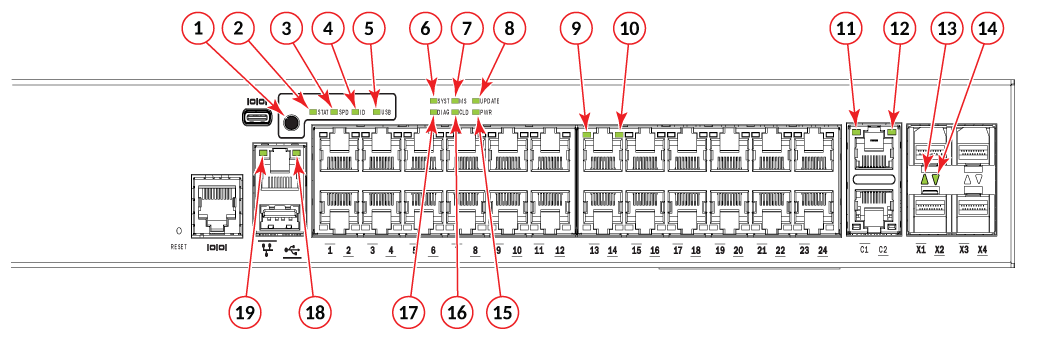
- Port status mode selection button
- Port link status mode LED
- Port speed status mode LED
- Member ID status mode LED
- USB status mode LED
- System status LED
- Master/Slave status LED
- Software update status LED
- RJ-45 port 13 RX/TX activity LED (if blinking indicates RX/TX activity)
- PoE LED
- RJ-45 uplink port C1 status LED
- RJ-45 uplink port C1 RX/TX activity LED
- SFP+ uplink port X1 status LED (if blinking indicates RX/TX activity)
- SFP+ uplink port X2 status LED (if blinking indicates RX/TX activity)
- Power status LED
- Cloud/On-premises-SmartZone management status LED
updated naming
- Diagnostics status LED
- OOB Link status LED (left)
- OOB Speed status LED (right)
Port-side LEDs of ICX 7150-48, ICX 7150-48PF, ICX 7150-48P, and ICX 7150-48P-ES
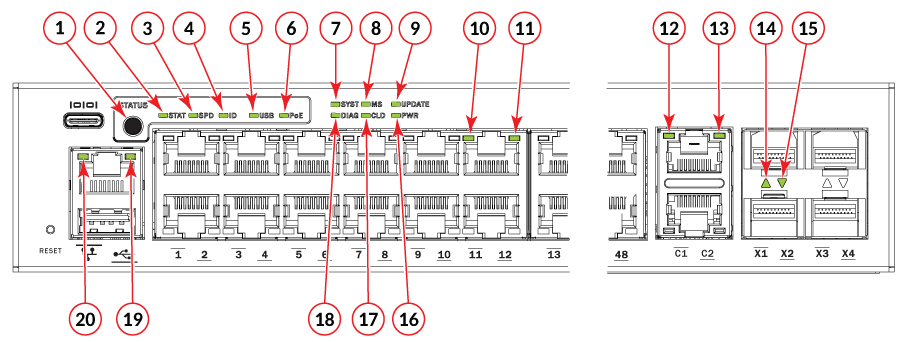
- Port status mode selection button
- Port link status mode LED
- Port speed status mode LED
- Member ID status mode LED
- USB status mode LED
- PoE status mode LED
- System status LED
- Master/Slave status LED
- Software update status LED
- RJ-45 port 11 RX/TX activity LED (if blinking indicates RX/TX activity)
- PoE LED
- RJ-45 uplink port C1 status LED
- RJ-45 uplink port C1 RX/TX activity LED
- SFP+ uplink port X1 status LED (if blinking indicates RX/TX activity)
- SFP+ uplink port X2 status LED (if blinking indicates RX/TX activity)
- Power status LED
- Cloud/On-premises-SmartZone management status LED
updated naming
- Diagnostics status LED
- OOB Link status LED (left)
- OOB Speed status LED (right)
Port-side LEDs of ICX 7150-C10ZP
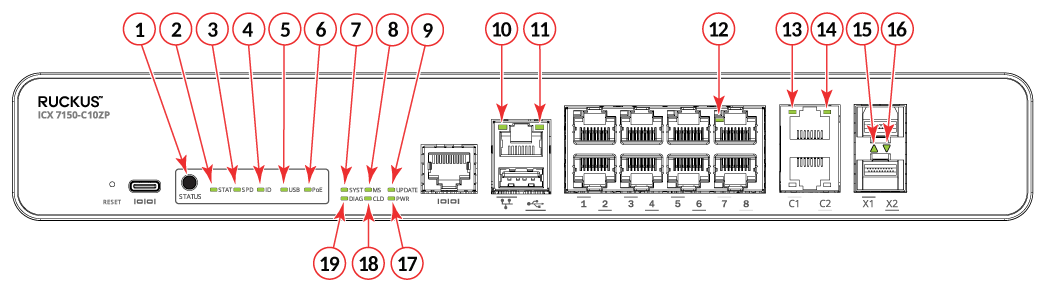
- Port status mode selection button
- Port link status mode LED
- Port speed status mode LED
- Member ID status mode LED
- USB status mode LED
- PoE status mode LED
- System status LED
- Master/Slave status LED
- Software update status LED
- OOB Link status LED (left)
- OOB Speed status LED (right)
- RJ-45 port 7 RX/TX activity LED (if blinking indicates RX/TX activity)
- RJ-45 uplink port C1 status LED
- RJ-45 uplink port C1 RX/TX activity LED
- SFP+ uplink port X1 status LED (if blinking indicates RX/TX activity)
- SFP+ uplink port X2 status LED (if blinking indicates RX/TX activity)
- Power status LED
- Cloud/On-premises-SmartZone management status LED
updated naming
- Diagnostics status LED
Port-side LEDs of ICX 7150-C08P
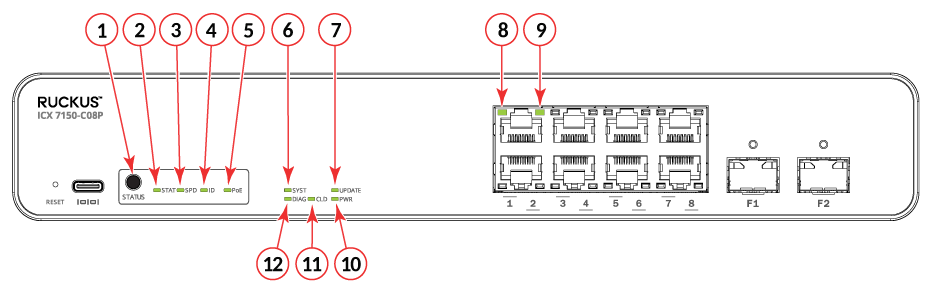
- Port status mode selection button
- Port link status mode LED
- Port speed status mode LED
- Unit ID status mode LED
- PoE status mode LED
- System Status LED
- Software update status LED
- RJ-45 port 2 RX/TX activity LED (if blinking indicates RX/TX activity)
- PoE LED
- Power status LED
- Cloud/On-premises-SmartZone management status LED
updated naming
- Diagnostics status LED
Port-side LEDs of ICX 7150-24F
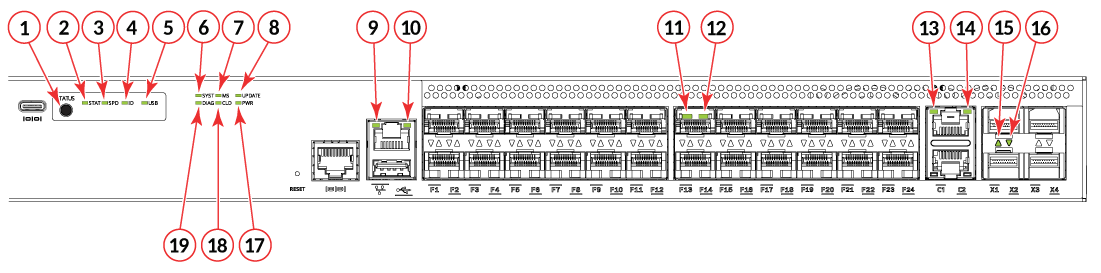
- Port status mode selection button
- Port link status mode LED
- Port speed status mode LED
- Member ID status mode LED
- USB status mode LED
- System status LED
- Master/Slave status LED
- Software update status LED
- OOB Link status LED (left)
- OOB Speed status LED (right)
- RJ-45 port 13 RX/TX activity LED (if blinking indicates RX/TX activity)
- PoE LED
- RJ-45 uplink port C1 status LED
- RJ-45 uplink port C1 RX/TX activity LED
- SFP+ uplink port X1 status LED (if blinking indicates RX/TX activity)
- SFP+ uplink port X2 status LED (if blinking indicates RX/TX activity)
- Power status LED
- Cloud/On-premises-SmartZone management status LED
- Diagnostics status LED
Port-side LEDs of ICX 7150-C08PT
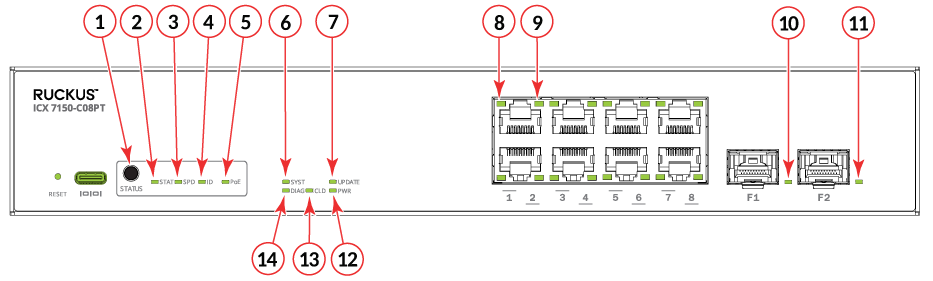
- Port status mode selection button
- Port link status mode LED
- Port speed status mode LED
- Unit ID status mode LED
- PoE status mode LED
- System Status LED
- Software update status LED
- RJ-45 port 2 RX/TX activity LED (if blinking indicates RX/TX activity)
- PoE LED
- F1 1G SFP Uplink LED
- F2 1G SFP Uplink LED
- Power status LED
- Cloud/On-premises-SmartZone management
status LED
updated naming
- Diagnostics status LED