Tenant Account Login
Tenant Logs In
Enter the hostname for the tenant account into a browser to access the tenant account and log in using the credentials previously set up. See the “Account Admin Setup Credentials” section of the Adding Tenant Accounts topic.
The hostname can be found in the Cloudpath Setup Information emailed to the account administrator.
To Do Items
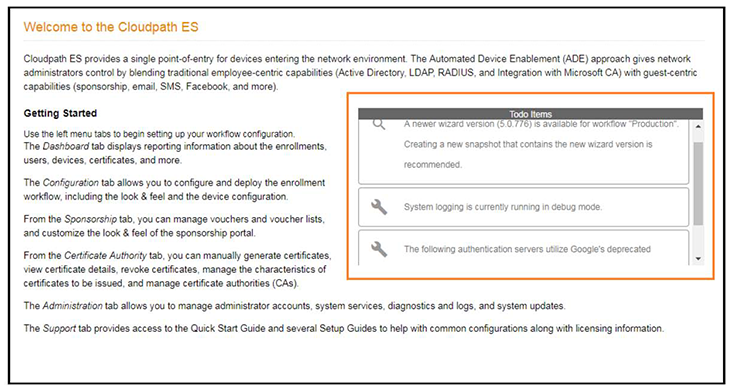
After account login, the Cloudpath Welcome page is displayed. If the ToDo Items list displays, the configuration items listed describe what is needed to complete the account setup.
Enrollment Workflow
During the initial system setup, a default workflow was configured. Navigate to to view and manage the enrollment workflow for the tenant account.
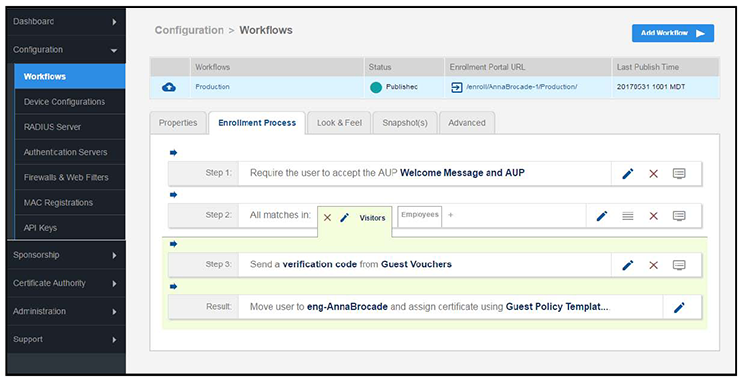
Refer to the complete set of technical documentation for more information about configuring the tenant account enrollment workflows.
Configuration documentation can be found on the tab, and also on the Ruckus Wireless Support website at: https://support.ruckuswireless.com/documents?filter=89#documents.