Building a Converged IoT Access Network
RUCKUS has developed the RUCKUS IoT Suite to enable a secure IoT access network. The following figure shows the various components that comprise the RUCKUS IoT Suite. The following steps provide a brief introduction to each component, and prerequisites to be considered before installing the components on the network.
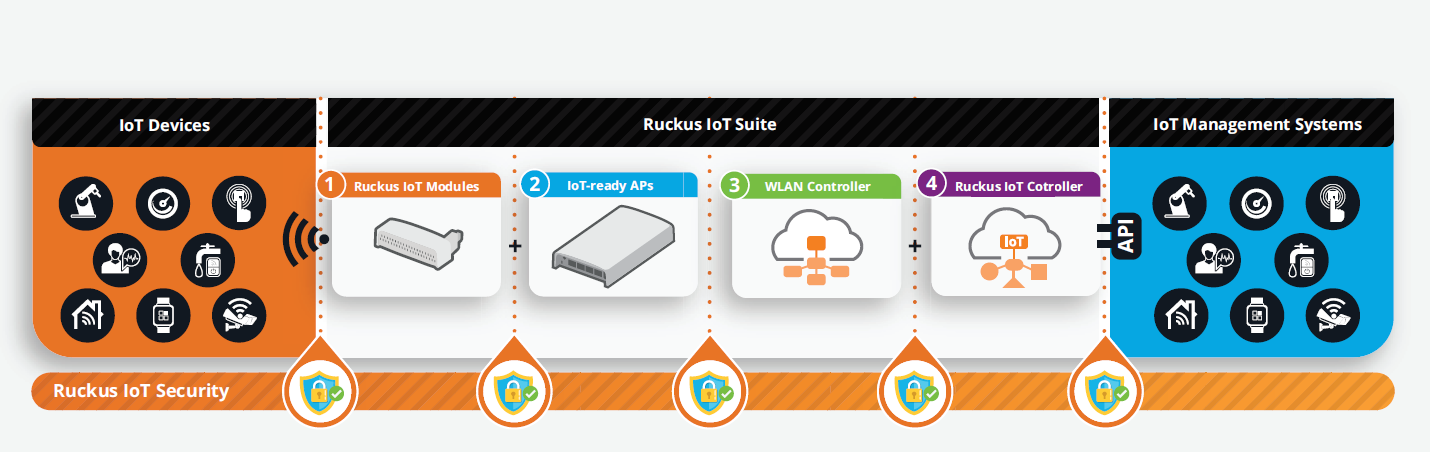
Step 1: Installing a RUCKUS IoT Controller
The RUCKUS IoT Controller is a virtual controller that integrates with the SmartZone Controller to perform connectivity, device, and security management functions for non-Wi-Fi devices. To know more about the system requiements for installing RUCKUS IoT Controller, refer to System Requirements for Installing RUCKUS IoT Controller on a Hypervisor.
For information on how to install the RUCKUS IoT Controller, refer to RUCKUS IoT Controller Installation Guide.
Step 2: Deploying RUCKUS Access Points and Ensuring Discovery of Controllers
Using the Dynamic Host Configuration Protocol (DHCP) Option 43 method, deploy RUCKUS Access Points (APs) and ensure discovery of the WLAN Controller and, subsequently, of the RUCKUS IoT Controller.
The IoT Access Point supports Option 43 with the following suboptions:
- Suboption 21: Used to configure a RUCKUS IoT Controller IPv4 address or FQDN (mandatory)
- Suboption 22: Used to set the control VLAN for IoT Control/Data traffic (optional)
Option 43 supports both binary and ASCII formats. The IoT Access Point bootup process checks for Option 43 and suboptions 21 and 22. Once the application receives this information, it uses the information to connect to the RUCKUS IoT Controller over the Pubsub channel.
Step 3: Configuring the RUCKUS IoT Controller and Initializing IoT Services
The RUCKUS IoT APs and devices can be managed using the RUCKUS IoT Controller.
Before you begin configuring RUCKUS IoT Controller services, consider the following prerequisites:
- The controller must be installed on a hypervisor.
- The RUCKUS IoT Module must be installed on the RUCKUS AP.
- The required credentials to log in to the RUCKUS IoT Controller must be secured.
For information on how to configure the RUCKUS IoT Controller, refer to the RUCKUS IoT Controller Configuration Guide.