Installing RUCKUS IoT Insights on a Linux KVM Machine
Setting Up the IoT Insights KVM Installer
- Download the file Insights2-qcow2_2.0.x.x.tar from the repository.
- Use the
tar xvf
                        Insights2-qcow2_2.0.x.xxx.tar
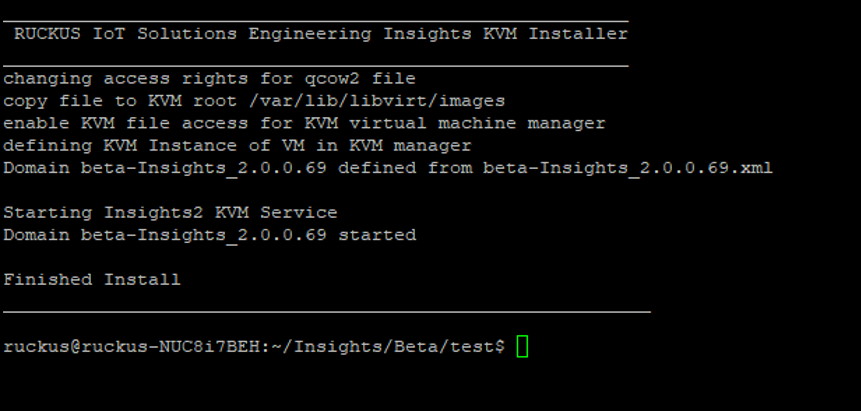
command to unzip the file, which will provide the following files:To ease the setup, the system provides preconfigured XML and scripts to install and configure the system. The XML and scripts assume certain file locations for KVM and Bridge configuration for Linux. If the locations are different, the system will not work and must be changed for correct operation. - Run the KVM Installer to install the ruckus@ruckus-NUC8i7BEH:~/Insights/Beta/test$ ./install.sh file, this will copy the VM Image to the install directory that is located under Linux operating system, and the name of the Insights VM is displayed in the KVM manager
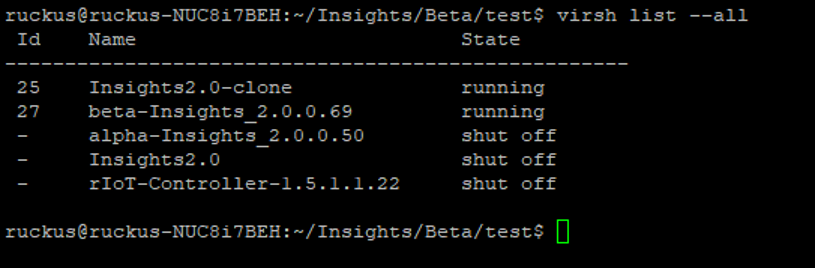
- After the installation is complete, the system starts automatically and the Insights2 image boots up. You can verify this by using the the virsh List --all command.
- After setting up the IoT Insights KVM Installer, refer to the topic Installing RUCKUS IoT Insights to complete the installation process.