Recovering Software
Software recovery involves recovering devices from image installation failure or deleted or corrupted flash images.
Note: When FIPS mode is enabled, the image cannot be updated from uboot or OS
prompt.
This recovery procedure is for all ICX devices.
For ICX 8100 and ICX 8200 devices, when this standard recovery process does not work, refer to Golden Image .
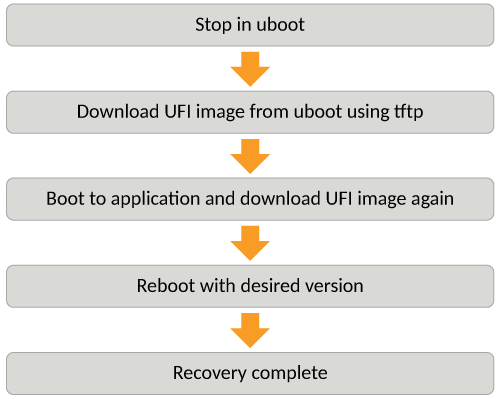
- Connect a console cable from the console port to the terminal server or computer.
- Connect an Ethernet cable from
the management port to the TFTP server. The management port is located next the USB port (for external disk drive) on the ICX devices.The device will be in boot mode for recovery.
- Display the existing variables
from the boot prompt.
ICX7650-Boot> printenv
baudrate=9600
boot_partition=pri_partition
bootcmd=run defbootcmd
bootdelay=3
console=ttyS0
crashkernel=crashkernel=96M
defbootcmd=setenv bootargs ip=${ipaddr}:${serverip}:${gatewayip}:${netmask}:${hostname}:${netdev}:off console=${console},9600,${extra_bootargs},${fips_reset} maxcpus=4 ${crashkernel} ${softdog} ${debug} pci=pcie_bus_safe root=/dev/ram ethaddr=${ethaddr}? ${quiet} boot_partition=${boot_partition}; ext4load scsi 0:1 0x90000000 ${image_to_boot}; bootm 0x90000200#conf@1
ethact=e1000#0
ethaddr=60:9c:9f:52:1f:bf
extra_bootargs=enabletelnet
fdt_high=0xffffffffffffffff
gatewayip=10.177.133.1
hostname=TANTO
image_to_boot=primary.bin
ipaddr=10.177.133.90
netdev=eth0
netmask=255.255.255.128
pcie_a=0
pcie_b=2
quiet=quiet
scsidevs=1
serverip=10.177.16.144
stderr=serial
stdin=serial
stdout=serial
uboot=tnu10120b35.bin
uboot_size=1572864
ver=10.1.20b35T235 (Apr 29 2021 - 23:49:16 -0700) Broadcom Northstar2
ver_red=10.1.20b35T235 (Apr 29 2021 - 23:49:16 -0700) Broadcom Northstar2

Environment size: 1056/131068 bytes
..
done
The path is to the boot image on the TFTP server. - Use the
setenv
                     serverip
command to set the TFTP server that hosts a valid ICX software image. - Use the
setenv
                     ipaddr
command to set the IP address, thesetenv gatewayipcommand to set the gateway IP address, and thesetenv netmaskcommand to set the netmask for the device management port; and use thesaveenvcommand to save the configuration. - Enter the
printenvcommand to verify the IP addresses that you configured for the device and the TFTP server.ICX7650-Boot> printenv baudrate=9600 boot_partition=pri_partition bootcmd=run defbootcmd bootdelay=3 console=ttyS0 crashkernel=crashkernel=96M defbootcmd=setenv bootargs ip=${ipaddr}:${serverip}:${gatewayip}:${netmask}:${hostname}:${netdev}:off console=${console},9600,${extra_bootargs},${fips_reset} maxcpus=4 ${crashkernel} ${softdog} ${debug} pci=pcie_bus_safe root=/dev/ram ethaddr=${ethaddr}? ${quiet} boot_partition=${boot_partition}; ext4load scsi 0:1 0x90000000 ${image_to_boot}; bootm 0x90000200#conf@1 ethact=e1000#0 ethaddr=60:9c:9f:52:1f:bf extra_bootargs=enabletelnet fdt_high=0xffffffffffffffff gatewayip=10.177.133.1 hostname=TANTO image_to_boot=primary.bin ipaddr=10.177.133.90 netdev=eth0 netmask=255.255.255.128 pcie_a=0 pcie_b=2 quiet=quiet scsidevs=1 serverip=10.177.16.144 stderr=serial stdin=serial stdout=serial uboot=tnu10120b35.bin uboot_size=1572864 ver=10.1.20b35T235 (Apr 29 2021 - 23:49:16 -0700) Broadcom Northstar2 ver_red=10.1.20b35T235 (Apr 29 2021 - 23:49:16 -0700) Broadcom Northstar2 Environment size: 1056/131068 bytes - Use the
pingcommand to test the connectivity to the TFTP server from the device to ensure a working connection. - Use the
setenv
                     image_name
command to provide the file name of the image that you want to copy from the TFTP server. - Use the
update_primaryorupdate_secondarycommand as appropriate to update the flash memory. - Use the
boot_primaryorboot_secondarycommand as appropriate to load the image from the primary or secondary flash memory.