Removing an Application Node From a Cluster
Follow the steps below to remove an application node from a cluster. The steps shown use the example of removing the application node 192.168.94.245 from the database node 192.168.94.243 (refer to Cluster With Two Database Nodes and Two Application Nodes.
- On the database node that the application node belongs to, open a terminal window
and log in to the service account:
- Port 8022 with SSH unless you change the port number
- Username: cpn_service
- Password: Enter the password.
The command-line configuration utility prompt (#) should display.
- Enter the command: replication remove-appnode
- You are presented with the following output,
to which you can answer yes:
------------------------------------------------------------------------------ * You will be prompted for the password of local system. ------------------------------------------------------------------------------ ------------------------------------------------------------------------------ WARNINGS: 1. This routine will remove an APP node from the cluster and must be performed on one of Database server nodes in the cluster. 2. Before starting this routine, make sure the affected APP node is a 'peer' APP server node to this Database server. ------------------------------------------------------------------------------ Do you want to continue? [y/n] - After answering yes, you are presented
with the following output and
prompt:
 ------------------------------------------------------------------------------
   WARNING:
   You're on Cluster Database Node: 192.168.94.243

   Peer APP Nodes:
   192.168.94.245
 ------------------------------------------------------------------------------

  APP node to remove (IP):
At the prompt, enter the IP address of the application node to remove, then hit Enter. In this example, the IP address is 192.168.94.245.
- The following display shows the completion of
the command once you enter the IP adddress of the node to remove. Check that the
end
of the display indicates that the node has been removed from the cluster.
APP node to remove (IP): 192.168.94.245


Checking remote host 192.168.94.245 ...
Will stop application services on App node 192.168.94.245 ...
Will stop and disable proxysql on App node 192.168.94.245 ...
Will reset web server cluster name on APP node 192.168.94.245 ...
Will remove database service permissions ...
Will enable and start mysql service on 192.168.94.245 ...
Done enabling and restarting mysql service on 192.168.94.245 ...
Will update cluster configuration ...
Will update cluster for peer DB server ...
Will notify cluster changes ....
Done cluster change notification on local system
Will notify cluster changes on the remote DB server 192.168.94.244 ...
Done cluster change notification on the remote DB server 192.168.94.244.
Will remove REPL_WHITELIST on 192.168.94.245 ...
Will remove cluster configurations from 192.168.94.245 ...
Will restart remote application services on 192.168.94.245 ...
Will cleanup cluster abandoned files on 192.168.94.245 ...
APP node 192.168.94.245 has been removed from the Cluster.
#
Verification of Node Removal Via the User Interface:
You can log in to any of the nodes that are still in the cluster to confirm that the node you removed no longer appears in the list of nodes, as shown in the following illustration:
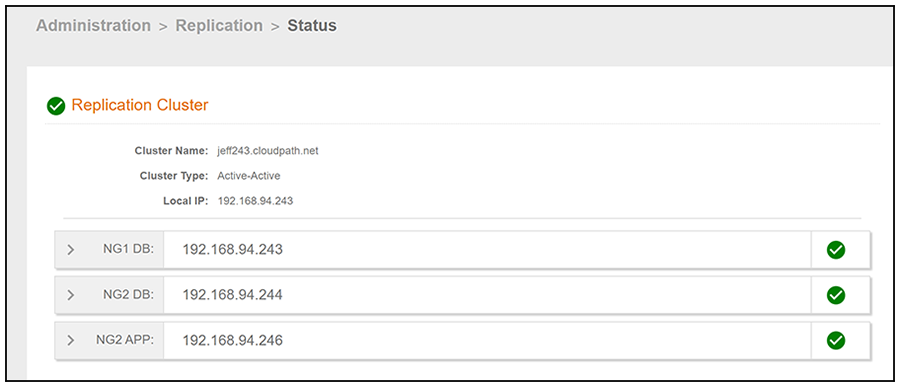
If you log in to the node that you just removed from the cluster, you are presented with the same initialization screen you received before you ever added the node to the cluster. You can then set this node up however you wish, including adding it back to its original node group, assigning it to a new cluster, adding it as the primary server of a new cluster, or using it as a standard Cloudpath server that is not part of a cluster.