Find Technical Content
  • Home
  • Ruckus Support Portal
  • Ruckus Networks
  • Table of Contents
  • Dark Mode

Powered by Titania Delivery

⚠ This cached page may be outdated. Click refresh to get the latest content.
Cached Version You are Offline

You are viewing a cached version of this page.

You are currently offline. This page was loaded from cache.

Troubleshooting Using Network Tools

  • 1 Troubleshooting Using the Network Tools
    • 1.1 Testing Network Connectivity
    • 1.2 Viewing Alarms and Configuring Alarm Settings
    • 1.3 Configuring Alarm Event Notification Settings
    • 1.4 Viewing System Event Messages
    • 1.5 Diagnostics
      • 1.5.1 Configuring Debug Logs
      • 1.5.2 Saving System Logs to Your Computer
    • 1.6 Capturing Remote Packets

Diagnostics

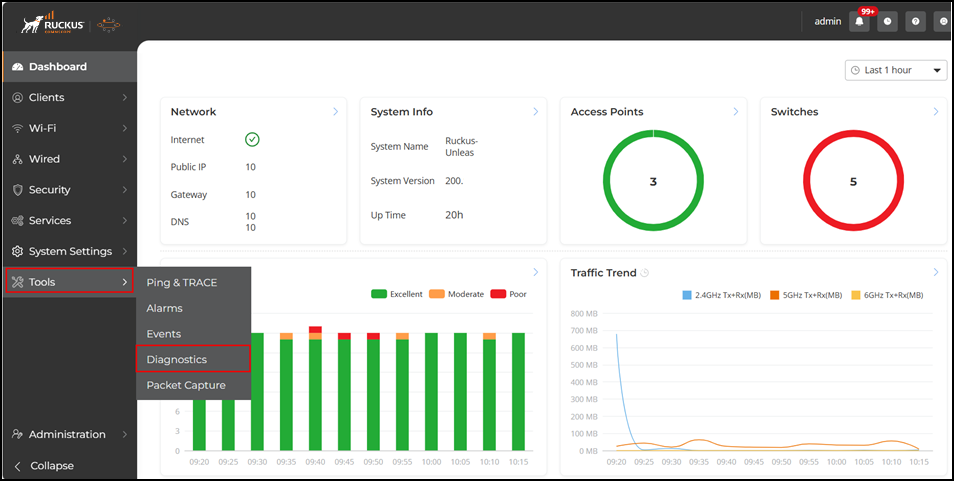
The Diagnostics page provides options for troubleshooting and diagnostics, including debug logs, system logs, configuring the debug component for log files, and saving the current logs to your local computer or remote server.

Configuring Diagnostics Options

In this section:

  1. Configuring Debug Logs
  2. Saving System Logs to Your Computer
Parent topic: Troubleshooting Using the Network Tools

Did you find what you were looking for?

Thanks!

Ruckus Wireless

© 2026 Ruckus Wireless LLC All rights reserved.

  • Accessibility
  • Privacy & Cookies
  • Do Not Sell My Information
  • Trademarks
  • Terms
  • Feedback