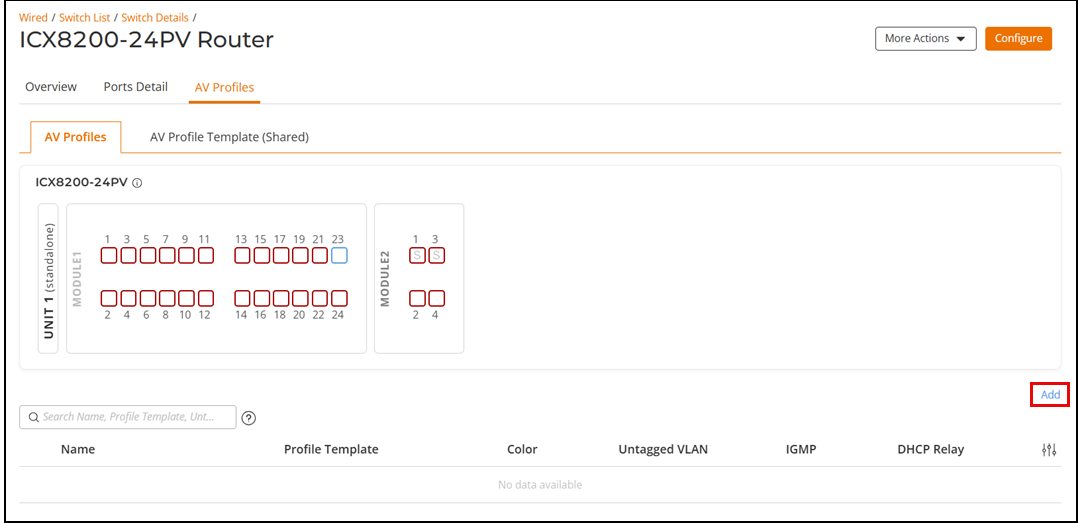
Navigating to the AV Profiles tab allows
you to view the following information about all the AV profiles configured on the
ICX
switches associated with the RUCKUS Unleashed network. The information is displayed in
table format, reflecting a default subset of columns. You can control which information
is included and excluded by clicking the icon and
selecting or deselecting column names checkboxes.
Name
Name of the AV profile.
Profile
Template
Name of the AV profile template.
Color
Color of the AV profile as seen from the ports diagram in the
AV Profiles tab.
Untagged
VLAN
Access VLAN associated with the specific ICX AV switch.
IGMP
Internet Group Management Protocol (IGMP) settings (Enabled or
Disabled).
Querier
Version
Version of IGMP (V2 or V3)
Querier
Election
Configurable IP address used in the Querier Election process.
Note: IGMP and Querier
Version settings are pre-configured for the built-in templates. Only
for custom templates, you can configure these settings. For the Data
AV profile template, the IGMP setting is disabled.
DHCP
Relay
Dynamic Host Configuration Protocol (DHCP) Relay settings (Enabled or
Disabled).
VLAN
IP
IP address of the VLAN.
Netmask
IP address of the DHCP netmask.
DHCP Server
IP address
IP address of the DHCP server that the relay agent forwards the DHCP
requests from the clients on its network.
You can search the results using the
Search field.
Enter the AV profile name, Profile Template, IGMP, Querier Version, Querier Election,
Querier IP Address, DHCP Relay, VLAN IP address, netmask, or DHCP server IP address
settings in the Search field. All matching AV profiles are displayed.
You can edit or delete the AV profiles using the Edit or
Delete options.
You can sort the AV Profiles table by
clicking any column header to sort the table by that column.
AV Profiles Sub-tab
The AV Profile Template (Shared) table allows you to view the
following information about all the AV profile templates.
Name
Name of the AV profile template. Built-in AV templates are defined as
follows:
AES67
Audio-Video: Use this template to connect the ICX switch to the
AES67 audio devices and their controller. AES67 is a standard
that transmits high-quality audio over IP networks.
Dante
Audio-Video: Use this template to connect the ICX switch to the
Dante audio devices and their controller. Dante is a technology
that transmits video and multiple channels of audio over
Ethernet cables.
NDI5-Video: Use
this template to connect the ICX switch to the video systems.
Network Device Interface (NDI5) is a standard that allows video
systems to communicate with one another over IP.
Q_SYS-Video: Use
this template to connect the ICX switch to the IP audio Q-SYS
devices and their controller. Q_SYS is a cloud platform that
integrates audio, video, and control processing in one
system.
Video: Use this
template to connect the ICX switch to the IP video devices and
their controller.
Data: Use this
template to connect the ICX switch to other network devices as
well as to computers.
Custom: Use this
template to build your customized AV profile template.
Description
Description of the AV profile template.
PTPv2
Precision Time Protocol (PTP) v2 setting (Enabled or
Disabled).
You can search the results using the
Search field.
Enter the AV profile template name or description in the Search field. All
matching AV profile templates are displayed.
You can edit, clone, or delete the custom
AV profile templates using the Edit, Clone, or Delete options. Only the clone operation is allowed for the
system-defined AV profile templates.
You can sort the AV Profiles table by
clicking any column header to sort the table by that column.
 icon and
selecting or deselecting column names checkboxes.
icon and
selecting or deselecting column names checkboxes.