Enabling Fanless Mode on an ICX Switch
Fanless mode enables the device to operate
with the fans disabled while limiting the PoE budget to 150 Watts. That is, when fanless
mode is enabled, the fan speed is set to zero RPM, thus allowing the device to operate
silently. You can enable fanless mode on an ICX switch from the RUCKUS Unleashed web
interface.
Note: ICX 7150-24P, ICX 7150-48P, ICX
8200-24, ICX 8200-24P, ICX 8200-48, ICX 8200-48P, and ICX 8200-48PF devices support
fanless mode.
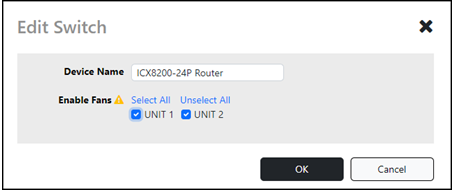
- From the dashboard, expand the Switches component, select a specific ICX switch, and click Edit.
- In the Edit Switch dialog box, for Enable
Fans, select a specific switch unit for which you wish to
disable fanless mode or click Unselect All to disable all
the fans on the switch and click OK.
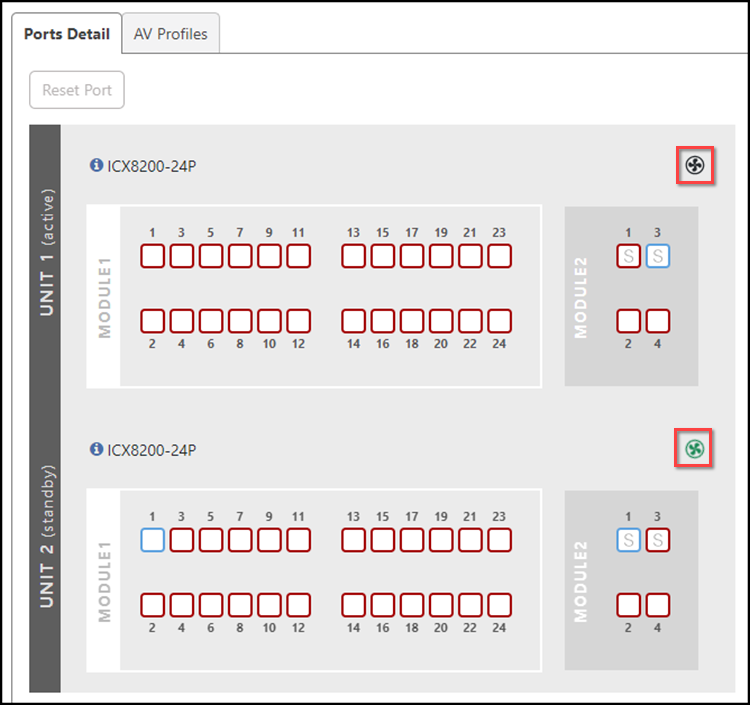
You can also enable the fanless mode from the Ports Detail tab. From the Switches component, click Show Ports Info to expand the port details view. In the Ports Detail tab, for a specific switch unit, click the
If a fan is enabled on a switch unit, then the icon to enable the fanless mode. A confirmation message is displayed.
Click Yes.
icon will appear rotating in green, else it will appear stationary in
black.
icon to enable the fanless mode. A confirmation message is displayed.
Click Yes.
icon will appear rotating in green, else it will appear stationary in
black.