Smart Redundancy Setup Through the Command Line Interface
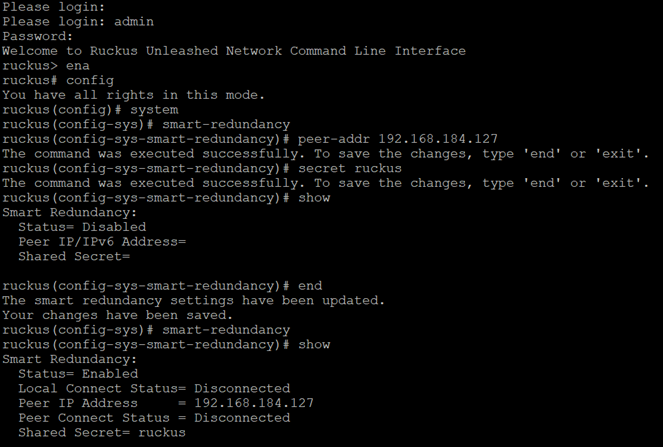
- Use SSH to access the CLI of Dedicated Master preferred as the primary.
- Enable Smart Redundancy, and configure the peer device IP address and the shared secret.
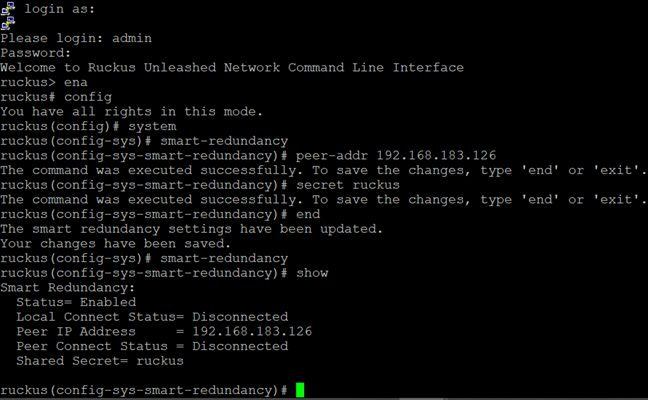
- Use SSH to access the CLI of the Dedicated Master preferred as the secondary.
- Enable Smart Redundancy, and configure the peer device IP address and the shared secret.
- Log in to the primary Dedicated
Master web interface and click Sync to peer to
synchronize the configuration from the local to the peer device (as shown in the
Smart Redundancy Setup
Through Manual Mode).Note: Command line interface does not support Smart Redundancy setup through auto mode; only Smart Redundancy setup through manual mode is supported.
- Check the Smart Redundancy status on the primary Dedicated Master.