Installing the Ethernet RJ-45 Cables
The device supports connection to other vendors’ routers, switches, hubs, as well as other RUCKUS devices through the appropriate ports, transceivers, and cables.
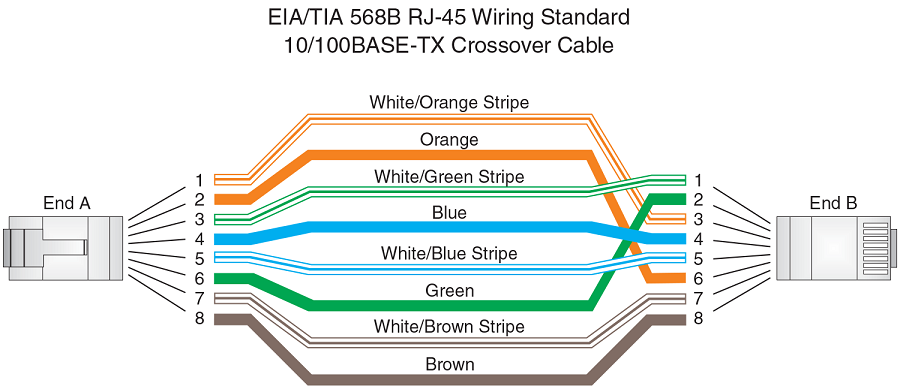
- For copper connections to Ethernet hubs, a 10/100Base-TX or 1000Base-T switch, or another RUCKUS device, a crossover cable is required as shown in the following figure. If the hub is equipped with an uplink port, it requires a straight-through cable instead of a crossover cable. The 802.3ab standard (automatic MDI or MDIX detection) calls for automatic negotiation of the connection between two 1000Base-T ports. In this case, a straight-through cable may work just as well as a crossover cable.
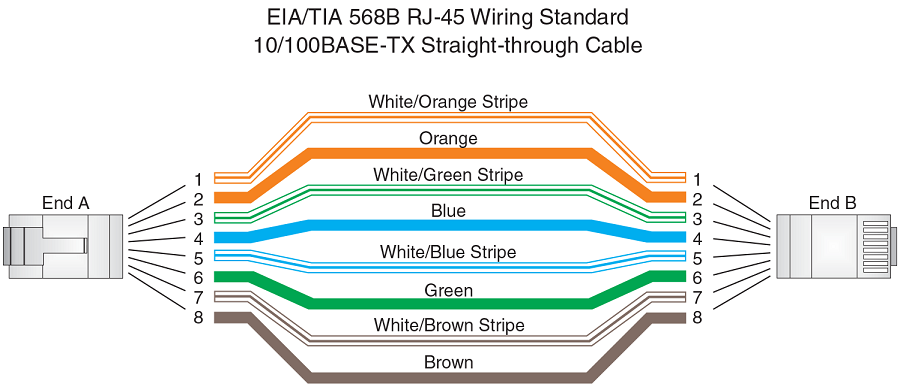
- Straight-through UTP cabling is required for direct UTP attachment to workstations, servers, or routers using network interface cards (NICs). Fiber-optic cabling is required for direct attachment to Gigabit NICs or switches and routers through fiber ports.
- All 10/100 and 1000 Mbps Ethernet copper ports on the devices support automatic Media Dependent Interface (auto-MDI) or automatic Media Dependent Interface Crossover (auto-MDIX) detection. Auto-MDI or auto-MDIX is enabled on all 10/100 and 1000 Mbps copper ports by default. For each port, you can disable auto-MDI or auto-MDIX, designate the port as an MDI port, or designate the port as an MDIX port.