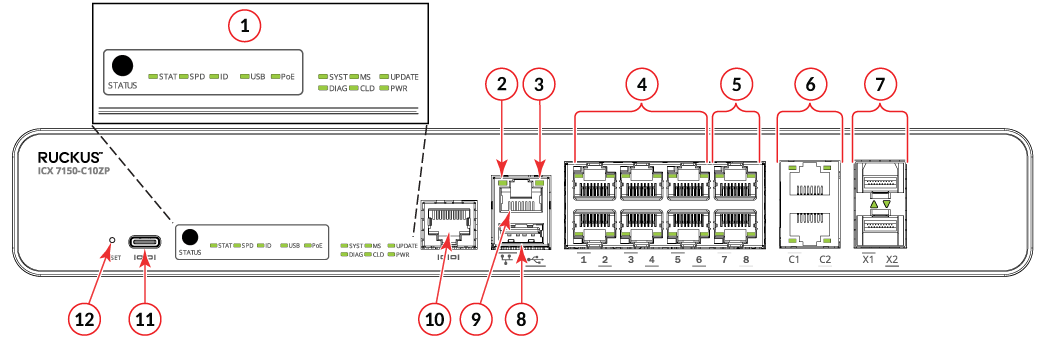
Port-side view

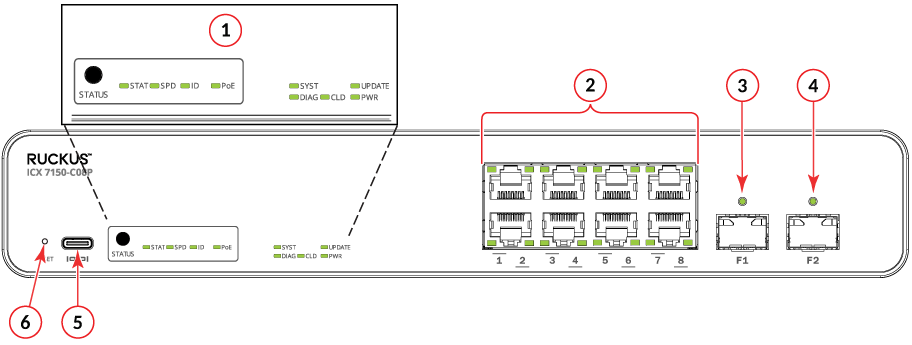
Port-side view of ICX 7150-C08P (No USB and Master/Slave LEDs)

  1. STATUS LEDs
  2. Ports 1-8 PoE+
  3. F1 1-GbE SFP Uplink
  4. F2 1-GbE SFP Uplink
  5. Type-C USB console port
  6. RESET LED

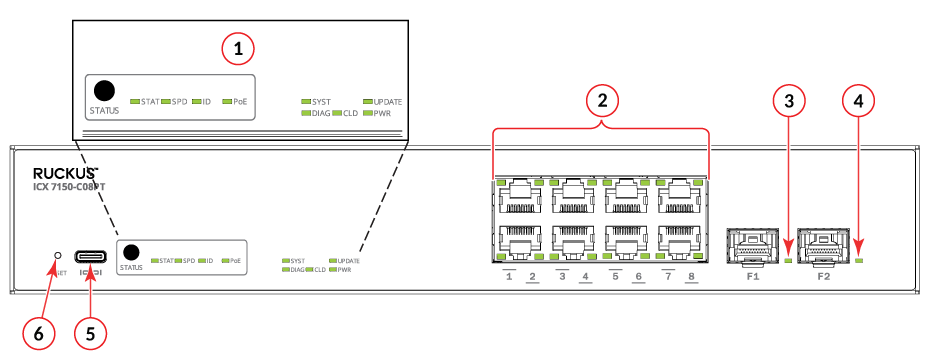
Port-side view of ICX 7150-C08PT (No Out-of-band management port)

  1. STATUS LEDs
  2. Ports 1-8 PoE
  3. F1 1-GbE SFP Uplink
  4. F2 1-GbE SFP Uplink
  5. Type-C USB console port
  6. RESET LED

Port-side view of ICX 7150-C10ZP

  1. STATUS LEDs
  2. LNK/ACT LED
  3. Speed LED
  4. Ports 1-6 PoE+
  5. Ports 7-8 PoH
  6. C1, C2 10ZP multi-gig copper ports support 100-Mbps, 1-Gbps, 2.5-Gbps, 5-Gbps, 10-Gbps speeds
  7. X1-X2 10-GbE SFP+ Stacking and Uplink
  8. Type-A USB port
  9. Out-of-band management port (RJ-45)
  10. RJ-45 console port
  11. Type-C USB console port
  12. RESET LED

Port-side view of ICX 7150-C12P and ICX 7150-C12P-ES
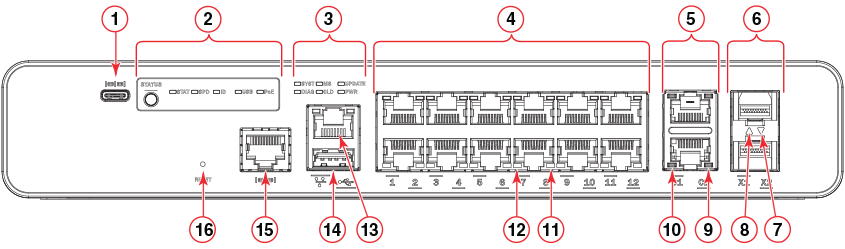
  1. Type-C USB console port
  2. Port status mode selection button and LEDs
  3. System LEDs
  4. Slot 1 (10/100/1000 Mbps RJ-45 downlink) ports
  5. Slot 2 (10/100/1000 Mbps RJ-45 uplink) ports (half-duplex is not supported on these ports)
  6. Slot 3 (SFP+ uplink or stacking ports)
  7. SFP+ Port X2 status LED
  8. SFP+ Port X1 status LED
  9. Reserved for future use
  10. RJ-45 uplink port C2 RX/TX activity LED
  11. Reserved for future use
  12. RJ-45 downlink port 8 RX/TX activity LED
  13. Out-of-band management port (RJ-45) with 2 LEDs
    1. Left LED - Off: Link-down, Steady green: Link-up, Blinking green: when there is RX/TX activity
    2. Right LED - Off: when offline or linked at 10/100 Mbps, Blinking green: when there is RX/TX activity
  14. USB port
  15. RJ-45 console port
  16. RESET button

Port-side view of ICX 7150-24, ICX 7150-24P, and ICX 7150-24P-ES
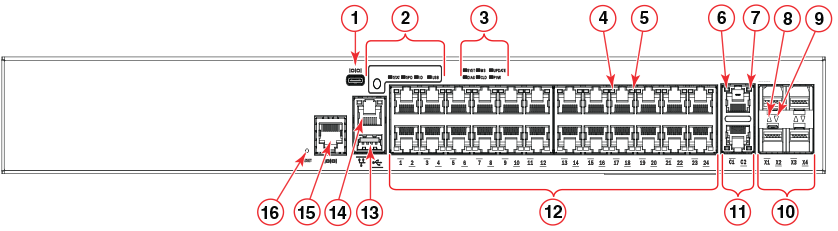
  1. Type-C USB console port
  2. Port status mode selection button and LEDs
  3. System LEDs
  4. RJ-45 downlink port 17 status LED
  5. RJ-45 downlink port 17 RX/TX activity LED
  6. RJ-45 uplink port C1 status LED
  7. RJ-45 uplink port C1 RX/TX activity LED
  8. SFP+ port X1 status LED
  9. SFP+ port X2 status LED
  10. Slot 3 (SFP+ uplink or stacking) ports
  11. Slot 2 (10/100/1000 Mbps RJ-45 uplink) ports (half-duplex is not supported on these ports)
  12. Slot 1 (10/100/1000 Mbps RJ-45 downlink) ports 1-24
  13. USB port
  14. Out-of-band management port (RJ-45) with 2 LEDs
    1. Left LED - Off: Link-down, Steady green: Link-up, Blinking green: when there is RX/TX activity
    2. Right LED - Off: when offline or linked at 10/100 Mbps, Blinking green: when there is RX/TX activity
  15. RJ-45 console port
  16. RESET button

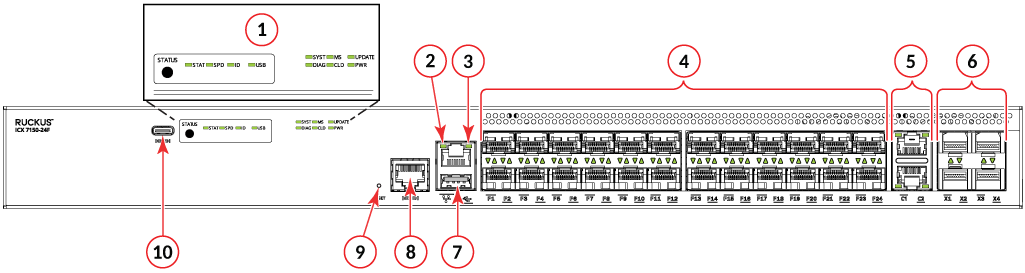
Port-side view of ICX 7150-24F

  1. STATUS LEDs
  2. LNK/ACT LED
  3. Speed LED
  4. Ports 1-24 1-GbE SFP Downlink
  5. C1, C2 1-GbE copper Uplink
  6. X1-X4 10-GbE SFP+ Stacking and Uplink
  7. Type-A USB port
  8. RJ-45 console port
  9. RESET LED
  10. Type-C USB console port

Port-side view of ICX 7150-48, ICX 7250-48P, ICX 7150-48PF, and ICX 7150-48P-ES
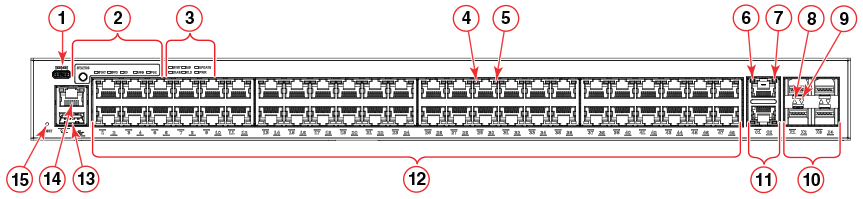
  1. Type-C USB console port
  2. Port status mode selection button and LEDs
  3. System LEDs
  4. RJ-45 downlink port 29 status LED
  5. RJ-45 downlink port 29 RX/TX activity LED
  6. RJ-45 uplink port C1 status LED
  7. RJ-45 uplink port C1 RX/TX activity LED
  8. SFP+ port X1 status LED
  9. SFP+ port X2 status LED
  10. Slot 3 (SFP+ uplink or stacking) ports
  11. Slot 2 (10/100/1000 Mbps RJ-45 uplink) ports (half-duplex is not supported on these ports)
  12. Slot 1 (10/100/1000 Mbps RJ-45 downlink) ports 1-48
  13. USB port
  14. Out-of-band management port (RJ-45) with 2 LEDs
    1. Left LED - Off: Link-down, Steady green: Link-up, Blinking green: when there is RX/TX activity
    2. Right LED - Off: when offline or linked at 10/100 Mbps, Blinking green: when there is RX/TX activity
  15. Reset button

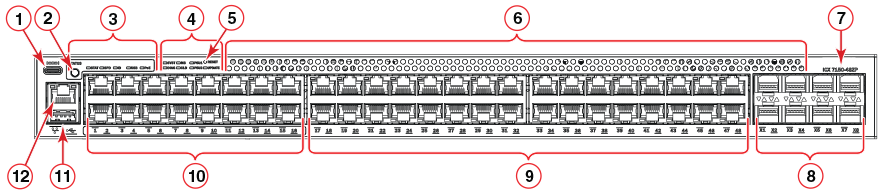
Port-side view of ICX 7150-48ZP

  1. Type-C USB console port
  2. Port status mode selection button
  3. Mode LEDs
  4. System LEDs
  5. Reset Button
  6. Venting holes
  7. Logo and Model name
  8. SFP+ Fiber Stacking/Uplink ports
  9. 1-GbE PoE-2 pair user Ports 17 - 48
  10. 2.5-GbE PoE-2 pair user Ports 1-16
  11. Type-A USB port
  12. Out-of-band management port (RJ-45) with 2 LEDs
    1. Left LED - Off: Link-down, Steady green: Link-up, Blinking green: when there is RX/TX activity
    2. Right LED - Off: when offline or linked at 10/100 Mbps, Blinking green: when there is RX/TX activity