Message Exchange During Authentication
The following figure illustrates a sample exchange of messages between an 802.1X-enabled client, an ICX device acting as the authenticator, and a RADIUS server acting as an authentication server.
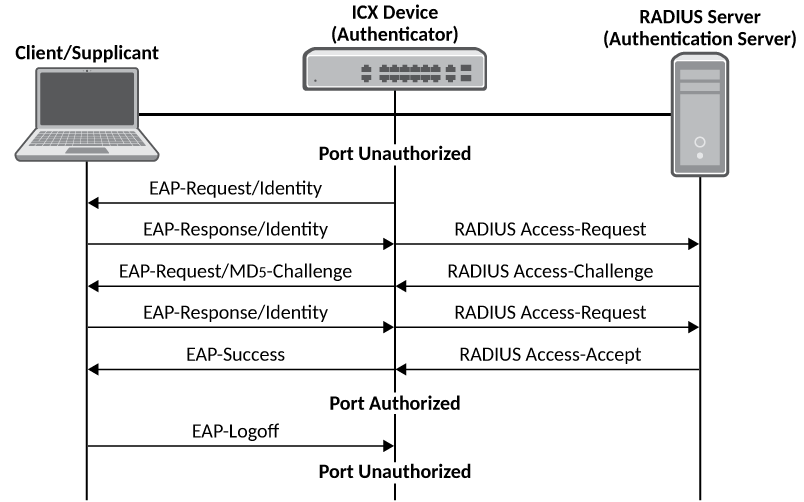
In this example, the authenticator (the ICX device) initiates communication with an 802.1X-enabled client. When the client responds, it is prompted for a username (255 characters maximum) and password. The authenticator passes this information to the authentication server, which determines whether the client can access services provided by the authenticator. When the client is successfully authenticated by the RADIUS server, the port is authorized. When the client logs off, the port becomes unauthorized again.
The ICX 802.1X implementation supports dynamic VLAN assignment. If one of the attributes in the Access-Accept message sent by the RADIUS server specifies a VLAN identifier, the client port becomes a MAC-VLAN member of the specified VLAN. When the client disconnects from the network, the port is removed from the authorized VLAN.
The ICX 802.1X implementation supports dynamically applying an IP ACL to a port in either the ingress or egress direction, based on information received from the authentication server.
If a client does not support 802.1X, authentication cannot take place. The ICX device sends EAP-Request/Identity frames to the client, but the client does not respond to them. When a client that supports 802.1X attempts to gain access through a non-802.1X-enabled port, it sends an EAP start frame to the ICX device. When the ICX device does not respond, the client considers the port to be authorized and starts sending normal traffic.
ICX devices support identity and MD5-challenge requests in EAP Request/Response messages, as well as the following 802.1X authentication challenge types:
- EAP-TLS (RFC 2716): EAP Transport Level Security (TLS) provides strong security by requiring both the client and the authentication server to be identified and validated through the use of public key infrastructure (PKI) digital certificates. EAP-TLS establishes a tunnel between the client and the authentication server to protect messages from unauthorized user eavesdropping activities. Because EAP-TLS requires PKI digital certificates on both the clients and the authentication servers, the roll out, maintenance, and scalability of this authentication method is much more complex than other methods. EAP-TLS is best for installations with existing PKI certificate infrastructures.
- EAP-TTLS (Internet-Draft): The EAP Tunneled
Transport Level Security (TTLS) is an extension of EAP-TLS. Like TLS, EAP-TTLS
provides strong authentication measures; however, it requires only the
authentication server to be validated by the client through a certificate exchange
between the server and the client. Clients are authenticated by the authentication
server using usernames and passwords.
A TLS tunnel can be used to protect EAP messages and existing user credential services such as Active Directory, RADIUS, and LDAP. Backward compatibility for other authentication protocols such as PAP, CHAP, MS-CHAP, and MS-CHAP-V2 are also provided by EAP-TTLS. EAP-TTLS is not considered foolproof and can be fooled into sending identity credentials if TLS tunnels are not used. EAP-TTLS is suited for installations that require strong authentication measures without the use of mutual PKI digital certificates.
- PEAP (Internet-Draft): Protected EAP (PEAP) is an Internet-Draft that is similar
to EAP-TTLS. A PEAP client authenticates directly with the back-end authentication
server. The authenticator acts as a pass-through device that does not need to understand
the specific EAP authentication protocols.
Unlike EAP-TTLS, PEAP does not natively support usernames and passwords to authenticate clients against an existing user database such as LDAP. PEAP secures the transmission between the client and the authentication server with a TLS-encrypted tunnel. PEAP also allows other EAP authentication protocols to be used. It relies on the mature TLS keying method for its key creation and exchange. PEAP is best suited for installations that require strong authentication without the use of mutual certificates.
Configuration for these challenge types is the same as for the EAP-MD5 challenge type.
jumbo command at the global configuration level of the CLI. If the supplicant or the RADIUS
server does not support jumbo frames and if jumbo support is enabled on the switch,
you can set the CPU IP MTU size. For more information on setting IP MTU size, refer
to the "IP Addressing" chapter in the
RUCKUS FastIron Layer 3 Routing Configuration Guide.