How Flexible Authentication Works
When only IEEE 802.1X authentication or MAC authentication is configured, the configured method is attempted. When authentication fails, the MAC address of the device is blocked (the default action) or is moved to a restricted VLAN when configured on the switch as the authentication failure action. If authentication succeeds, the client is authenticated, and the policies returned by the RADIUS server are applied. When both IEEE 802.1X authentication and MAC authentication methods are configured, authentication is performed depending on the authentication order, as explained in the following sections.
Authentication Order: IEEE 802.1X Authentication Followed by MAC Authentication
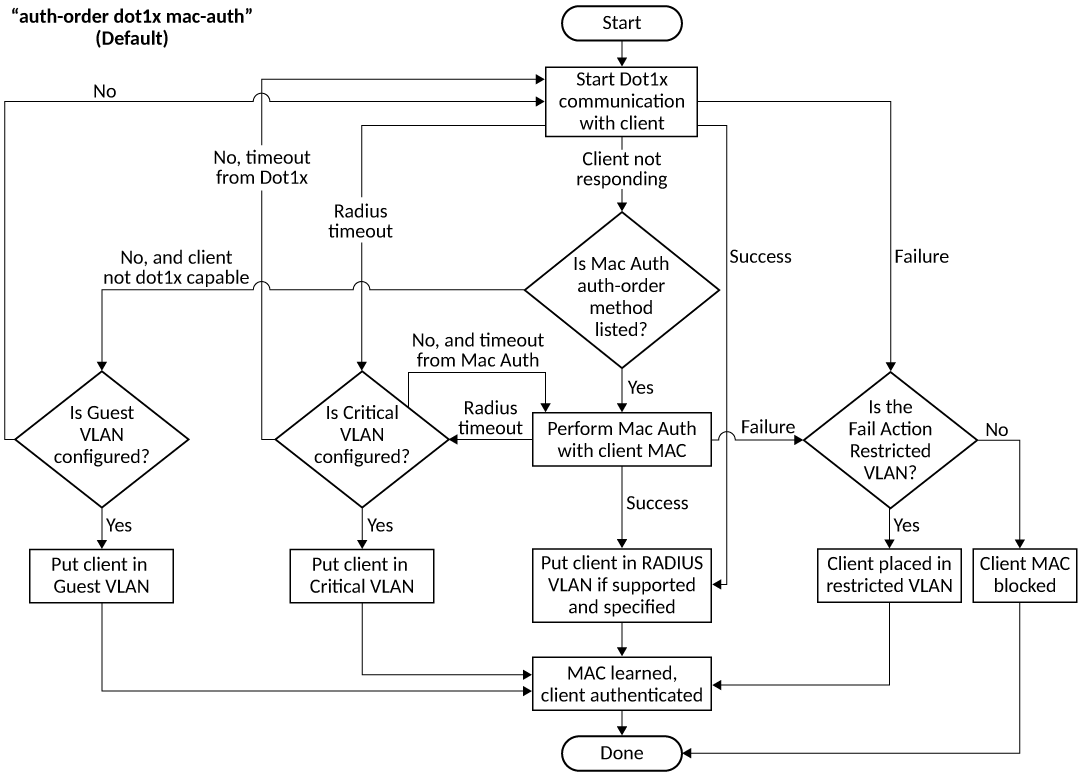
When the IEEE 802.1X authentication and MAC authentication methods are enabled on the same port, the default authentication order is to perform IEEE 802.1X authentication followed by MAC authentication (refer to Authentication sequence - 802.1X authentication followed by MAC authentication).
When IEEE 802.1X authentication succeeds, the client is authenticated, and the policies returned by the RADIUS server are applied. MAC authentication is not performed in this case. If IEEE 802.1X authentication fails and MAC authentication override is configured, MAC authentication is attempted; otherwise, the failure action is carried out. If the client does not respond to dot1x messages, MAC authentication is attempted after the client is declared non-dot1x-capable. On successful MAC authentication, the client is authenticated, and the policies returned by the RADIUS server are applied. On authentication failure, the configured failure action is applied.
Authentication Order: MAC Authentication Followed by IEEE 802.1X Authentication
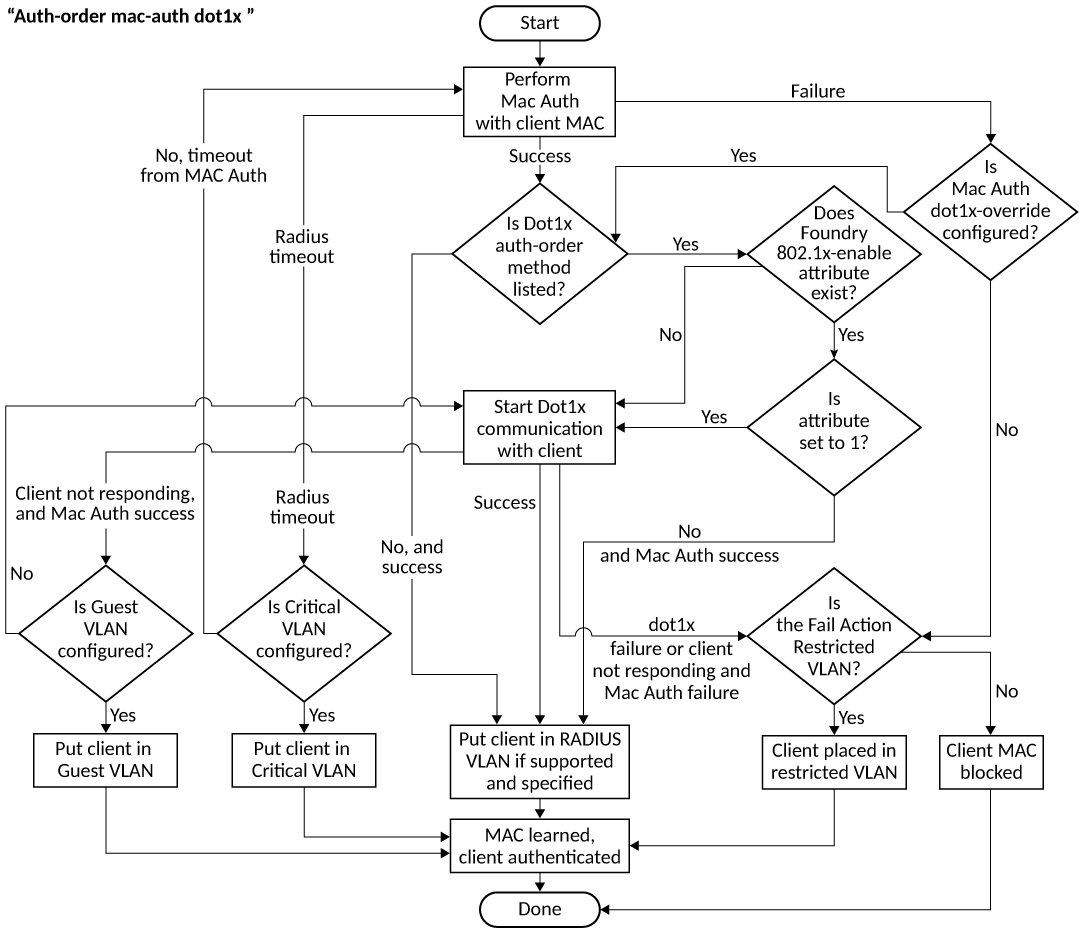
When the authentication order is set to perform MAC authentication followed by IEEE 802.1X authentication, by default, IEEE 802.1X authentication is performed, even if MAC authentication is successful (refer to Figure: Authentication sequence - MAC authentication followed by 802.1X authentication). On successful IEEE 802.1X authentication, the client is authenticated, and the policies returned by the RADIUS server are applied. On authentication failure, the configured failure action is applied.
The default behavior can be changed by specifying
the RADIUS attribute (refer to Company-specific
attributes on the RADIUS server) to prevent the IEEE 802.1X
authentication from being performed after successful MAC authentication or by
configuring mac-authentication dot1x-disable. In this case, the client is
authenticated, and the policies returned by the RADIUS server are applied after
successful MAC authentication.
When MAC authentication fails, IEEE 802.1X
authentication is not attempted, and the configured failure action is applied.
However, if the mac-authentication dot1x-override command is configured, the clients
that failed MAC authentication undergo IEEE 802.1X authentication. If IEEE 802.1X
authentication is successful, the policies returned by the RADIUS server are applied
to the port. If IEEE 802.1X authentication fails, the failure action is applied
to
the client.
When the timeout-action is "success" and the client is dot1x-capable, both authentication methods are tried. The client is placed in the auth-default VLAN, and EAP-SUCCESS is sent by the device. When the timeout-action is "critical-vlan" and the client is dot1x-capable, both authentication methods are tried, the client is placed in the critical VLAN, and EAP-SUCCESS is sent by the device.
The following list describes how Flexible authentication works in various success, failure, timeout, and dynamic VLAN assignment scenarios:
- When authentication succeeds and RADIUS returns VLAN information, the client is dynamically assigned to the RADIUS-assigned VLAN (the MAC address of the client is assigned to the VLAN), and authorization is carried out, depending on the attributes returned from the RADIUS server. For more information, refer to Dynamic VLAN assignment.
- If RADIUS does not return any VLAN information after authentication, the client is placed in the auth-default VLAN.
- If the authentication fails, the failure action is carried out as per the configured failure action, for example, blocking the client or moving the client to the restricted VLAN.
- When the RADIUS server times out
and authentication timeout action is configured as "success", the client is
authenticated in the auth-default VLAN or the previously authenticated VLAN,
depending on the following conditions:
- If the RADIUS timeout occurs during the first authentication attempt, the client is authenticated in the auth-default VLAN.
- If the RADIUS timeout occurs during reauthentication of a previously authenticated client, the client is retained in the previously authenticated VLAN with the existing dynamic ACL allocation.
- When the RADIUS server times out
and authentication timeout action is configured as "critical-VLAN", the
client is authenticated in the critical VLAN or the previously authenticated
VLAN, depending on the following conditions:
- If the RADIUS timeout occurs during the first authentication attempt, the client is authenticated in the critical VLAN.
- If the RADIUS timeout occurs during reauthentication of a previously authenticated client, the client is retained in the previously authenticated VLAN with the existing dynamic ACL allocation.
- When the RADIUS server times out and the authentication timeout action is configured as "failure", the configured auth-failure-actions is performed, for example, moving the client to the restricted VLAN or blocking the client.
- During authentication, when RADIUS returns ACLs and the ACLs are not configured on the ICX device, the client authentication fails by default, resulting in the client being blocked.