Authenticating an IP phone when RADIUS fails or times out
Prior to completing the following task, the RADIUS server must be configured and you must create a profile for the IP phone on the RADIUS server with the attributes shown in the following table.
Authenticating an IP phone when RADIUS fails or times out
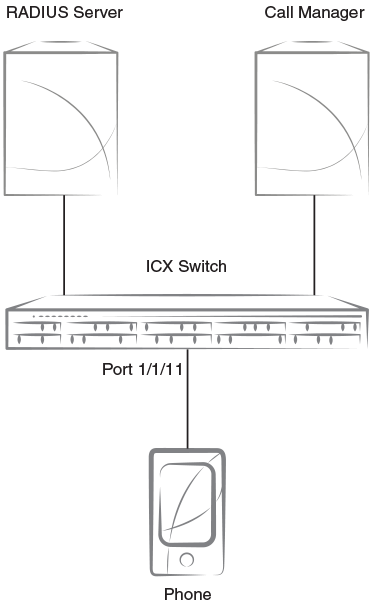
The preceding figure shows a configuration in which an IP phone is connected to an ICX device that uses a RADIUS server for authentication. The following task shows how to configure the ICX device to authenticate the IP phone using MAC authentication in a voice VLAN when RADIUS fails or times out.
- From privileged EXEC mode, enter global configuration mode.
- Configure a RADIUS server on the device.
device(config)# radius-server host 10.20.64.208 auth-port 1812 acct-port 1813 default key secret dot1x mac-auth
In this example, the IP address of the RADIUS server is 10.20.64.208 and the shared key specified for communication with the server is “secret”. The shared key must match the key specified during client configuration on the RADIUS server. UDP port 1812 is used for RADIUS authentication messages and UDP port 1813 is used for RADIUS accounting messages. - Configure an auth-default VLAN.
The auth-default VLAN must be configured to enable authentication. When a port is enabled for MAC authentication, by default it is moved into the auth-default VLAN as a MAC-based VLAN member. When the RADIUS server only authenticates the client and does not return a VLAN where the client should be placed, the client is placed in the auth-default VLAN. This example configures VLAN 2 as the auth-default VLAN and then returns to global configuration mode.
- Configure a voice VLAN.
An authentication-enabled port must be a tagged member of the voice VLAN prior to use by an IP phone for the voice calls. This example configures VLAN 200 as the voice VLAN and then returns to global configuration mode.
- Enter authentication configuration mode.
- Specify the previously configured auth-default VLAN (VLAN 2) for authentication.
- Specify the previously configured default voice VLAN (VLAN 200) for authentication.
Is the following note correct for this step?Note: LLDP, with default MED policies (priority = 5 and dscp = 46), is automatically enabled on the port with voice VLAN.
- Specify the critical VLAN ID used for authentication.
-
Note: TheConfigure the RADIUS timeout action.
auth-timeout-actioncommand takes effect only when flexible authentication is enabled on the ports. Therefore, flexible authentication must be enabled on ports prior to configuring the RADIUS timeout action. The RADIUS timeout action must also be reconfigured after a change to the flexible authentication status of a port.In this example, when RADIUS is not reachable, data devices are moved to the critical VLAN and voice devices to the voice VLAN. - Specify the restricted VLAN ID used for authentication.
-
Note: TheConfigure the RADIUS failure action.
auth-fail-actioncommand takes effect only when flexible authentication is enabled on the ports. Therefore, flexible authentication must be enabled on ports prior to configuring the authentication failure action. The authentication failure action must also be reconfigured after a change to the flexible authentication status of a port.In this example, when RADIUS fails to authenticate the client, data devices are moved to the restricted VLAN and voice devices are moved to the voice VLAN. - Enable MAC authentication on the device.
- Enable MAC authentication on Ethernet interface 1/1/11.
- Return to global configuration mode.
- Enter interface configuration mode for Ethernet interface 1/1/11.
- Enable Power over Ethernet (PoE) on the interface.
- Return to privileged EXEC mode.
- Verify the configuration.
The following example shows how to configure an ICX device to authenticate the IP phone using MAC authentication in a voice VLAN when RADIUS fails or times out.
device# configure terminal

device(config)# radius-server host 10.20.64.208 auth-port 1812 acct-port 1813 default key secret dot1x mac-auth

device(config)# vlan 2 name auth-default-vlan
device(config-vlan-2)# exit

device(config)# vlan 200 name voice-vlan
device(config-vlan-200)# exit

device(config)# authentication
device(config-authen)# auth-default-vlan 2
device(config-authen)# voice-vlan 200
device(config-authen)# critical-vlan 20
device(config-authen)# auth-timeout-action critical-vlan voice voice-vlan
device(config-authen)# restricted-vlan 4
device(config-authen)# auth-fail-action restricted-vlan voice voice-vlan
device(config-authen)# mac-authentication enable
device(config-authen)# mac-authentication enable ethernet 1/1/11
device(config-authen)# exit

device(config)# interface ethernet 1/1/11
device(config-if-e1000-1/1/11)# inline power
device(config-if-e1000-1/1/11)# end