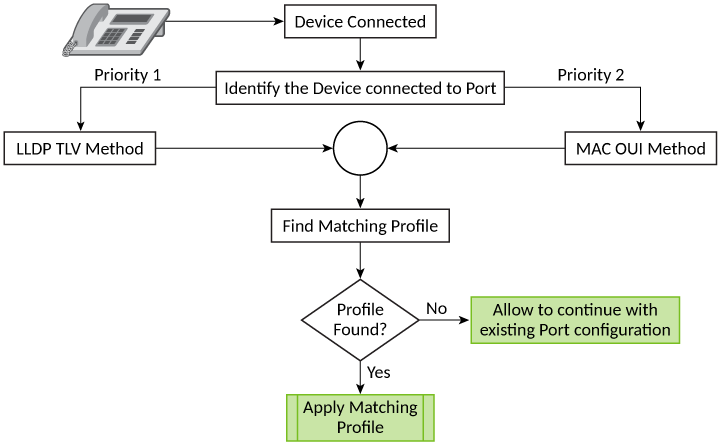
Port Profile Overview
When a device is connected to an ICX port, the profile mapped to that device is applied on that port. Using port profile, you do not need to configure ports manually, which simplifies the deployment of RUCKUS APs and other end devices such as VoIP phones, CCTV cameras, printers, and other devices. Port profile is supported on RUCKUS ICX 7550, RUCKUS ICX 7650, RUCKUS ICX 7850, RUCKUS ICX 8100, and RUCKUS ICX 8200 devices.
There are two ways to apply the port configuration using port profile:
-
Static port profile: The port profile configuration can be applied manually to a specific port using the CLI. When a static profile configuration is applied on a port, the configuration remains even if the device is disconnected. Ports that have been assigned a static profile allow additional configurations to be added, thereby permitting per-port customization. Any changes made to the port attributes are reflected on the port when the configurations are applied using the CLI.
-
Dynamic port profile: The port profile configuration is applied automatically to a port based on the connected end device. The ICX device detects the LLDP-TLV or MAC-OUI of the end device and applies the predefined profiles automatically. The port configured with a dynamic profile allows configuration changes only through that profile. Any changes made to the attributes of a dynamic profile are applied to all the ports where the profile is applied. When the device is disconnected from the port, the profile is automatically removed.
Port profile can be classified into two functional areas:
Device Identification: The port profile feature uses either a Link Layer Discovery Protocol-Tag Length Value (LLDP-TLV) or the MAC-Organizational Unique Identifier (MAC-OUI) to identify the connected devices.
The Tag Length Value (TLV) is a way of storing data to facilitate quick parsing of that data. For device identification, port profile first looks for an LLDP-TLV and, if a matching device and profile is found, the matching profile configuration for the device is applied to the port. LLDP-TLV device identification takes priority. If LLDP-TLV lookup fails, the MAC-OUI information is used to find the matching profile.
An Organizational Unique Identifier (OUI) is the first three octets of a MAC address. For example, F8-E7-1E is the RUCKUS proprietary MAC-OUI. The MAC-OUI can be mapped to preconfigured profiles once the device is connected to the port. If the device MAC-OUI matches with the mapped MAC-OUI, the respective profile is applied to the port.
Profile Management: Using port profile, you can define a set of port attributes that can be used by multiple interfaces. After you create a port profile, you can assign it to specific interfaces or to a port group. You can create, update, and delete port profiles using the CLI. Only one port profile can be applied to an interface. When a device is connected to a port with no predefined profile or if profile matching is not found, the port operates as a regular data port.
A port profile must include the following configurable attributes:
- VLANs (tagged and untagged)
- PoE granular setting
- ACL
- Authentication method (dot1x, MAC, and so on)
- Port security
- Speed (Optional)
- DHCP snooping (Optional)
- BPDU guard (Optional)