Find Technical Content
  • Home
  • Ruckus Support Portal
  • Ruckus Networks
  • Table of Contents
  • Dark Mode

Powered by Titania Delivery

⚠ This cached page may be outdated. Click refresh to get the latest content.
Cached Version You are Offline

You are viewing a cached version of this page.

You are currently offline. This page was loaded from cache.

DHCP server

  • 1 DHCP Servers
    • 1.1 DHCP Servers
      • 1.1.1 DHCPv4 Server NAK Support
      • 1.1.2 Configuration Considerations for DHCP Servers
      • 1.1.3 Configuring the DHCP Server and Creating an Address Pool
        • 1.1.3.1 DHCP server configuration
      • 1.1.4 Default DHCP Server Settings
    • 1.2 DHCP Server Options
    • 1.3 Disabling or re-enabling the DHCP server on the management port
    • 1.4 Setting the wait time for ARP ping response
    • 1.5 DHCP relay agent information support (option 82)
    • 1.7 Configuring the IP address of the DHCP server
    • 1.8 Configuring the Boot Image
    • 1.9 Deploying an Address Pool Configuration to the Server
    • 1.10 Specifying the Default Router Available to the Client
    • 1.11 Specifying DNS Servers Available to the Client
    • 1.12 Configuring the Domain Name for the Client
    • 1.13 Configuring the lease duration for the address pool
    • 1.14 Configuring the Number of Leases for the Address Pool
    • 1.15 Specifying addresses to exclude from the address pool
    • 1.16 Configuring the NetBIOS server for DHCP clients
    • 1.17 Configuring the Subnet and Mask of a DHCP Address Pool
    • 1.18 Configuring the TFTP Server
    • 1.19 Configuring X Window System Display Manager IP Addresses (Option 49)
    • 1.20 Vendor-specific Information (Option 43 and Option 60) Configurations
      • 1.20.1 Configuring Vendor Details and Vendor Specific Information (Option 43 and Option 60)
    • 1.21 Enabling static IP to MAC address mapping
    • 1.22 Enabling IP to Physical Port Mapping
    • 1.23 Configuring Avaya IP Telephony (Options 176 and 242)
    • 1.24 Configuring WPAD (option 252)
    • 1.25 Displaying DHCP server information

DHCP server configuration

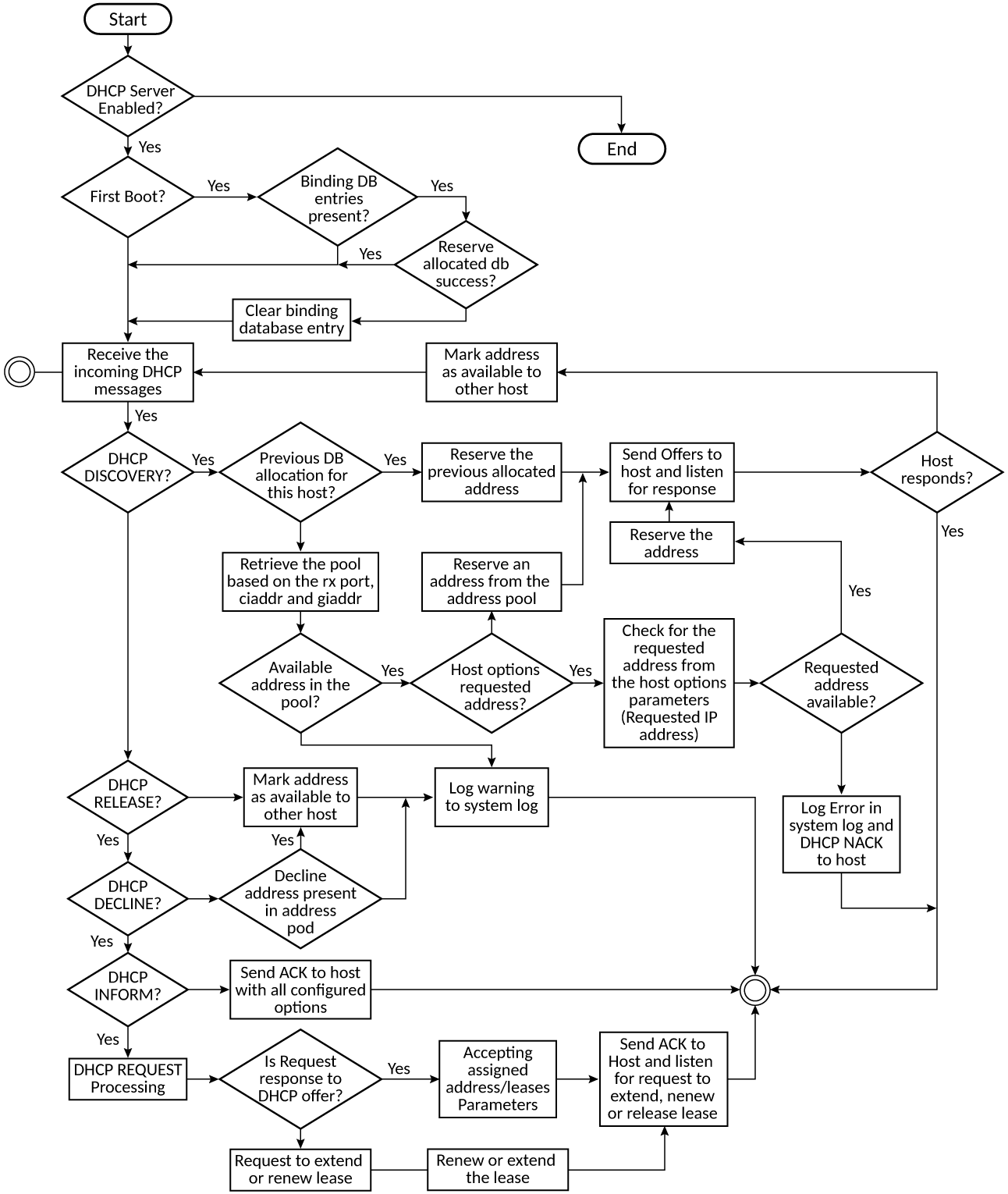
The following flowchart illustrates the DHCP server configuration procedure.

DHCP server configuration flowchart

Parent topic: Configuring the DHCP Server and Creating an Address Pool

Did you find what you were looking for?
Thanks!

Ruckus Wireless

© 2026 Ruckus Wireless LLC All rights reserved.

  • Accessibility
  • Privacy & Cookies
  • Do Not Sell My Information
  • Trademarks
  • Terms
  • Feedback