DPSK Pools
The following table lists the properties that can be used in the body of a DPSK-pool-related request and/or are provided in the response body. (In the "Optional" column, if a default value is applicable, it is listed in angle brackets (< >).
Resource: DPSK Pools
| Property Name | Type | Editable | Sort/Filter | Optional in Request/Response Body? | Description |
|---|---|---|---|---|---|
| guid | String | No | Neither | Optional on create only, but not on any subsequent uses | The unique identifier for this DPSK pool. |
| additionalAttributes | List <Attribute> | Yes | No | Yes | For Cloudpath releases greater than initial 5.7 release, this propety is ignored for this resource. Instead, this property can be specified in a Radius Attributes Group resource. For more information, refer to Resource: RadiusAttributeGroup . |
| classid | String | Yes | Neither | Yes | For Cloudpath releases greater than initial 5.7 release, this propety is ignored for this resource. Instead, this property can be specified in a Radius Attributes Group resource. For more information, refer to Resource: RadiusAttributeGroup . |
| description | String | Yes | Neither | No | A description for this pool. |
| deviceCountLimit | Int | Yes | Neither | No <1> | If you set the enforceDeviceCountLimit parameter to true, you can specify the number of devices that are allowed to utilize the DPSK pool you are creating. |
| displayName | String | Yes | Filter | No | The display name for this pool; must be unique. |
| enabled | Boolean | Yes | Filter | No<true> | Indicates if this DPSK pool is enabled. Switching from true to false disables the pool. |
| enforceDeviceCountLimit | Boolean | Yes | Neither | No<false> | If true, each DPSK is assigned a maximum device count as specified in the deviceCountLimit parameter. If false, an unlimited number of devices can utilize the DPSK. |
| enforceExpirationDate | Boolean | Yes | Neither | No <false> | If true, newly generated DPSKs are assigned an expiration date that is based on the creation date and the defined offset. |
| expirationDateType | String | Yes | Neither | No <END_OF_MONTH> | A Specific date in format YYYYMMDD, or a type of: MINUTES_AFTER_TIME, HOURS_AFTER_TIME, DAYS_AFTER_TIME, WEEKS_AFTER_TIME, MONTHS_AFTER_TIME, QUARTERS_AFTER_TIME , YEARS_AFTER_TIME , END_OF_HOUR , END_OF_DAY , END_OF_WEEK , END_OF_MONTH , END_OF_QUARTER , END_OF_HALF , END_OF_YEAR |
| expirationDateValue | Int | Yes | Neither | No <1> | Will be used if HOURS_AFTER_TIME is provided in the expirationDataType |
| filterid | String | Yes | Neither | Yes | For Cloudpath releases greater than initial 5.7 release, this propety is ignored for this resource. Instead, this property can be specified in a Radius Attributes Group resource. For more information, refer to Resource: RadiusAttributeGroup . |
| phraseDefaultLength | int | Yes | Neither | No<12> | The pass phrase default length. |
| phraseRandomCharactersType | Enum <String> | Yes | Filter | No | An enum that indicates the characters to be included in the passphrase. ALPHANUMERIC_UPPER, ALPHANUMERIC_LOWER, ALPHANUMERIC_MIXED, ALPHABETIC_UPPER, ALPHABETIC_LOWER, ALPHABETIC_MIXED, NUMERIC, ASCII |
| sessionTimeout | Long | Yes | Neither | No | For Cloudpath releases greater than initial 5.7 release, this propety is ignored for this resource. Instead, this property can be specified in a Radius Attributes Group resource. For more information, refer to Resource: RadiusAttributeGroup . |
| ssidList | List <String> | Yes | Neither | No | A list of SSIDs as strings for this DPSK pool. |
| vlanid | String | Yes | Neither | Yes | For Cloudpath releases greater than initial 5.7 release, this propety is ignored for this resource. Instead, this property can be specified in a Radius Attributes Group resource. For more information, refer to Resource: RadiusAttributeGroup . |
| isUsePolicies | Boolean (true) | Yes | No | Optional on create only, but not on any subsequent uses. | This is a new property beginning with with releases
later than the initial 5.7 release. This property cannot be set using an
API to create a new DPSK pool, but a "true" value for this property
allows you to convert pre-5.7 DPSK pools to pools where you apply a
configured policy. Once you make this change, it cannot be undone and
the vlanId, classid, filterid, sessionTimeout, and additionalAttributes
properties are all removed from a resource response. From that point
going forward, these properties will not be updated in a PUT request and
will be ignored in a POST request.
Note: If you created a DPSK
pool via an API call in the initial 5.7 release, it is still in the
older format without an attached policy. However, if you created a
DPSK pool via the UI in the initial 5.7 release, it already will be
in the new, policy-applied format.
Note: To complete the
conversion of the DPSK pool to the policy-applied pool type, refer
to the following steps:
|
| links | Link | No | No | No | Contains the following link as hrefs for use in other API calls: |
DPSK Pool URIs and Actions
The following table indicates the URIs that you can append to the root URI, along with the actions you can take, and possible return codes you can receive.
DPSK Pool URIs and Actions
| URI | Action | Description | Return Codes |
|---|---|---|---|
| /dpskPools | GET | Returns the list of all eDPSK pools that are in the system. |
401 - Unauthorized 200 - OK |
| POST | Creates an eDPSK pool. |
401 - Unauthorized 201 - Created |
|
| /dpskPools/{guid} | GET | Returns the specific eDPSK pool. |
404 - Not Found 401 - Unauthorized 200 - OK |
| DELETE | Deletes the pool specified and all its child resources, including DPSKs, devices, and associated enrollments. |
500 - Internal Server Error (such as " Pool in use") 401 - Unauthorized 204 - No content 200 - OK |
|
| PUT | Updates an eDPSK pool. See the Resource: DPSK Pools and Resource: Attribute for which properties can be edited. |
404 - Not Found 401 - Unauthorized 200 - OK |
Example of Using GET for DPSK Pools
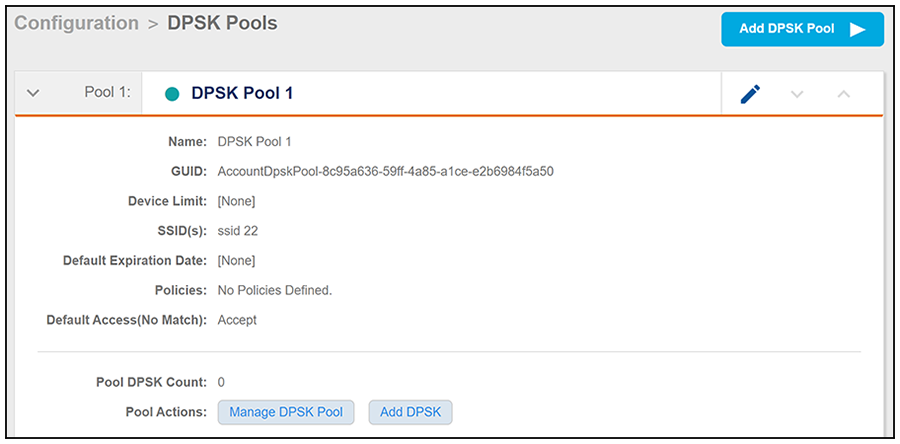
This example demonstrates how to obtain information about a DPSK pool that has already been created in the Cloudpath UI. (Instructions on creating DPSK pools in the UI are located in the Cloudpath Enrollment System Ruckus External Dynamic Pre-Shared Key (eDPSK) Configuration Guide.) The following figure shows information about a DPSK pool called DPSK Pool 1 that has been created in the UI.
This example uses the following URI:
https://Jeff243.cloudpath.net/admin/apiv2/BmGsez6evQc8/dpskPools
- https://Jeff243.cloudpath.net/admin/apiv2 is the root URI of the Cloudpath system being used (must include https, as shown)
- BmGsez6evQc8 is an example of an API key generated from the Configuration > API Keys section of the Cloudpath UI
The following table shows the required request headers for this URI example, with an example value of an active token that must be pasted into the Authorization header value:
Request Headers
| Key | Value |
|---|---|
| Content-type | application/json |
| Authorization | eyJhbGciOiJIUzI1NiJ9.eyJzdWIiOiJqZWZmLnJob2RpZUBjb21tc2NvcGUuY29tIiwicm9sZVBrIjoiMjEwMDAiLCJhY2NvdW50QWRtaW5QayI6IjIiLCJhcGlLZXkiOiJaV2NjTGpQZUdZMGUiLCJpYXQiOjE1NzU1NzUxNTcsImV4cCI6MTU3NTU3NTQ1N30.2q4KTyDUevkAAz7mJyp529Be1-ip3EC8P06Xarmz5ao |
None required.
Use the GET action to send the request.
Once the request is sent, you will receive a "Status: 200 OK" if the GET is successful. The response body provides information about all existing DPSK pools in your Cloudpath system. In this example, DPSK Pool 1 is the only existing pool. You can see that the information in the response body matches the configuration of DPSK Pool 1 as specified in the UI (for example, the "guid" values are the same in each place, the SSID list is the same, and so on). Any values that were not specified in the UI are the default values:
{
    "page": {
        "page": 1,
        "pageSize": 1,
        "totalCount": 1
    },
    "contents": [
        {
            "guid": "AccountDpskPool-8c95a636-59ff-4a85-a1ce-e2b6984f5a50",
            "displayName": "DPSK Pool 1",
            "description": "",
            "enabled": true,
            "phraseDefaultLength": 12,
            "phraseRandomCharactersType": "ALPHABETIC_LOWER",
            "ssidList": [
                "ssid 22"
            ],
            "enforceExpirationDate": false,
            "expirationDateType": "MONTHS_AFTER_TIME",
            "expirationDateValue": "1",
            "enforceDeviceCountLimit": false,
            "deviceCountLimit": 1,
            "supportsPolicies": true,
            "links": [
                {
                    "rel": "self",
                    "href": "https://jeff243.cloudpath.net/admin/apiv2/BmGsez6evQc8/dpskPools/AccountDpskPool-8c95a636-59ff-4a85-a1ce-e2b6984f5a50",
                    "hreflang": null,
                    "media": null,
                    "title": null,
                    "type": null,
                    "deprecation": null
                },
                {
                    "rel": "dpsks",
                    "href": "https://jeff243.cloudpath.net/admin/apiv2/BmGsez6evQc8/dpskPools/AccountDpskPool-8c95a636-59ff-4a85-a1ce-e2b6984f5a50/dpsks?page=1&pageSize=10{&filter,orderBy}",
                    "hreflang": null,
                    "media": null,
                    "title": null,
                    "type": null,
                    "deprecation": null
                },
                {
                    "rel": "policy",
                    "href": "https://jeff243.cloudpath.net/admin/apiv2/BmGsez6evQc8/dpskPools/AccountDpskPool-8c95a636-59ff-4a85-a1ce-e2b6984f5a50/policies?page=1&pageSize=100{&filter,orderBy}",
                    "hreflang": null,
                    "media": null,
                    "title": null,
                    "type": null,
                    "deprecation": null
                }
            ]
        }
    ]
}
Example of Using POST to Create a DPSK Pool
This example demonstrates how to create a new DPSK pool in your Cloudpath system by using the REST API POST call.
This example uses the following URI:
https://Jeff243.cloudpath.net/admin/apiv2/BmGsez6evQc8/dpskPools
- https://Jeff243.cloudpath.net/admin/apiv2 is the root URI of the Cloudpath system being used (must include https, as shown)
- BmGsez6evQc8 is an example of an API key generated from the Configuration > API Keys section of the Cloudpath UI
The following table shows the required request headers for this URI example, with an example value of an active token that must be pasted into the Authorization header value:
Request Headers
| Key | Value |
|---|---|
| Content-type | application/json |
| Authorization | eyJhbGciOiJIUzI1NiJ9.eyJzdWIiOiJqZWZmLnJob2RpZUBjb21tc2NvcGUuY29tIiwicm9sZVBrIjoiMjEwMDAiLCJhY2NvdW50QWRtaW5QayI6IjIiLCJhcGlLZXkiOiJaV2NjTGpQZUdZMGUiLCJpYXQiOjE1NzU1NzUxNTcsImV4cCI6MTU3NTU3NTQ1N30.2q4KTyDUevkAAz7mJyp529Be1-ip3EC8P06Xarmz5ao |
The following is an example of a request body for creating a DPSK pool. You can refer to the preceding Resource tables for a list and descriptions of properties you can use to define your pool. For instance, in this example, a pool called "DPSK Pool 20" is being created with the values provided in the body.
{
"displayName": "DPSK Pool 20",
"description": "",
"enabled": true,
"phraseDefaultLength": 11,
"phraseRandomCharactersType": "ALPHABETIC_LOWER",
"ssidList": [
"SSID19",
"SSID20"
],
"enforceExpirationDate": false,
"expirationDateType": "MONTHS_AFTER_TIME",
"expirationDateValue": "1",
"enforceDeviceCountLimit": true,
"deviceCountLimit": 4
}
Use the POST action to send the request.
Once the request is sent, you will receive a "Status: 201 Created" if the POST is successful. You can see that a "guid" (a unique identifier for the newly created pool) is included in the response body.
{
    "guid": "AccountDpskPool-14dc1ed8-ba2a-43bd-8cad-e30dc5f20fb8",
    "displayName": "DPSK Pool 20",
    "description": "",
    "enabled": true,
    "phraseDefaultLength": 11,
    "phraseRandomCharactersType": "ALPHABETIC_LOWER",
    "ssidList": [
        "SSID19",
        "SSID20"
    ],
    "enforceExpirationDate": false,
    "expirationDateType": "MONTHS_AFTER_TIME",
    "expirationDateValue": "1",
    "enforceDeviceCountLimit": true,
    "deviceCountLimit": 4,
    "supportsPolicies": true,
    "links": [
        {
            "rel": "self",
            "href": "https://jeff243.cloudpath.net/admin/apiv2/BmGsez6evQc8/dpskPools/AccountDpskPool-14dc1ed8-ba2a-43bd-8cad-e30dc5f20fb8",
            "hreflang": null,
            "media": null,
            "title": null,
            "type": null,
            "deprecation": null
        },
        {
            "rel": "dpsks",
            "href": "https://jeff243.cloudpath.net/admin/apiv2/BmGsez6evQc8/dpskPools/AccountDpskPool-14dc1ed8-ba2a-43bd-8cad-e30dc5f20fb8/dpsks?page=1&pageSize=10{&filter,orderBy}",
            "hreflang": null,
            "media": null,
            "title": null,
            "type": null,
            "deprecation": null
        },
        {
            "rel": "policy",
            "href": "https://jeff243.cloudpath.net/admin/apiv2/5XcTc6SjkHDL/dpskPools/AccountDpskPool-14dc1ed8-ba2a-43bd-8cad-e30dc5f20fb8/policies?page=1&pageSize=100{&filter,orderBy}",
            "hreflang": null,
            "media": null,
            "title": null,
            "type": null,
            "deprecation": null
        }
    ]
}
Verifying the Newly Created DPSK Pool in the Cloudpath UI:
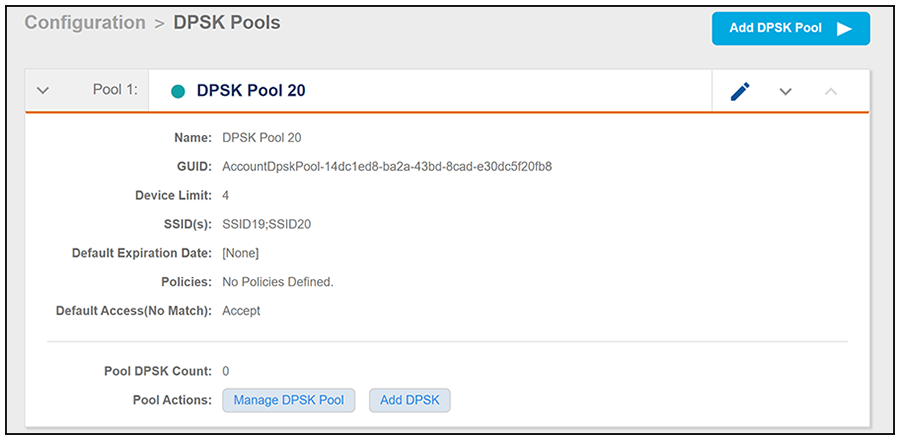
You can go to the Configuration > DPSK Pools area of the UI, and expand the pool to confirm that the pool was created correctly. The values should match those in the Response body from the POST. For example, in this expanded view, you can see that the GUID matches the one provided in the Response body.