System Settings
System settings include options for changing the system name, preferred Master AP, IP address, time zone, country code, users, user roles, and Mesh settings.
From the main menu, select System Settings to configure system settings. The menu expands to display additional options under System Management, Wireless and Network Settings.
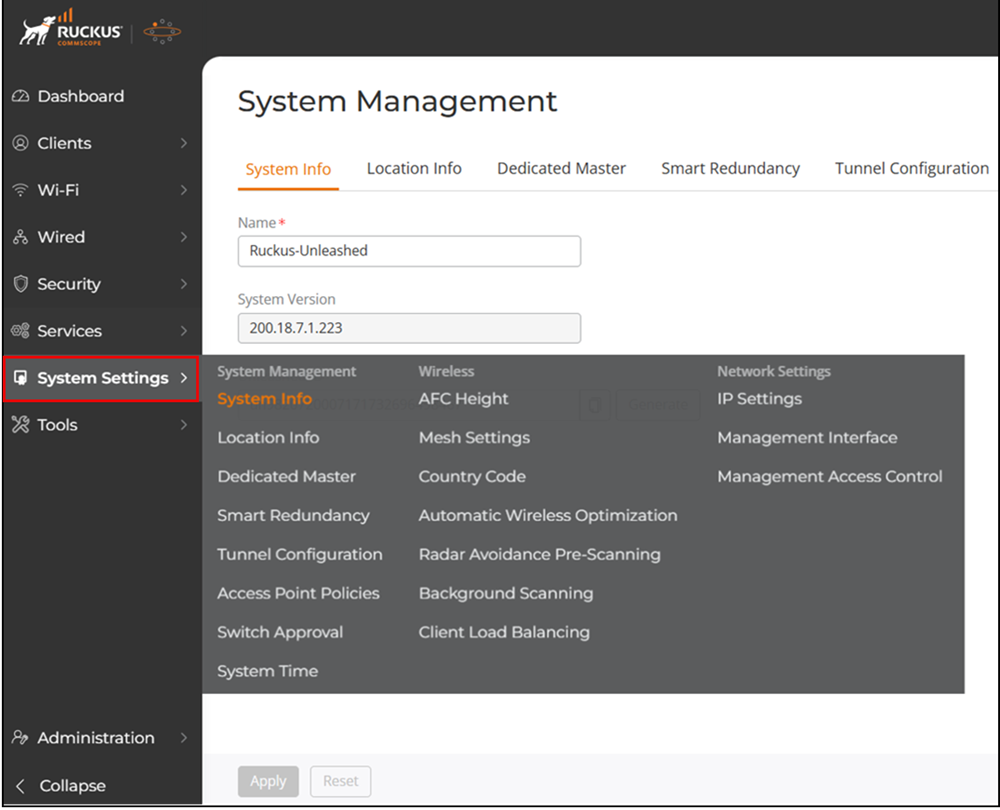
In this section:
- System Info Settings
- Setting the System Location and GPS
InformationThe Location Info page displays the geographical location information of an Unleashed network, as well as the GPS settings, so that it can be accurately displayed on the map available on the Remote Management Services (RMS) or Unleashed Remote portal.
- Configuring the AFC HeightAfter you have enabled the Enable Indoor AFC option for any indoor AP or AP Group (refer to Enabling Automated Frequency Coordination from Unleashed), then you must also configure the range of heights at which the indoor APs are installed. Providing the height of APs at a specific location helps AFC to ensure accurate geolocation and optimal interference management by determining the potential interference footprint.This topic is reused between Unleashed 200.18 and the AFC User Guides. Please check with the product writer and use appropriate platform-specific conditions when adding new content.
- Designating a Preferred Master AP
- Tunnel ConfigurationOnly WLANs that are enabled with Tunnel mode are affected.
- Configuring Global Access Point Policies
- Enabling Automatic Switch Approval
- Configuring the System Time
- Mesh Networking
- Setting the Country Code
- Automatic Wireless Optimization
- Radar Avoidance Pre-Scanning
- Background Scanning
- Client Load Balancing
- IP SettingsThe IP Settings tab provides options for configuring the IP address of the Master AP, IP address mode, management IP interface, and DHCP options.
- Configuring a Management InterfaceThe Management IP address can be configured to allow an administrator to manage the Unleashed network from a single IP address, regardless of which Unleashed AP is currently the Unleashed Master AP.
- Configuring a Management Access Control
- Disabling WLAN Service on the Master APBecause the Master AP has to perform a number of tasks at once, it may be useful in some scenarios to reduce the compute load on the Master AP by disabling its WLAN service and allow the Master to focus on controller functions.
Parent topic: Configuring System & Services