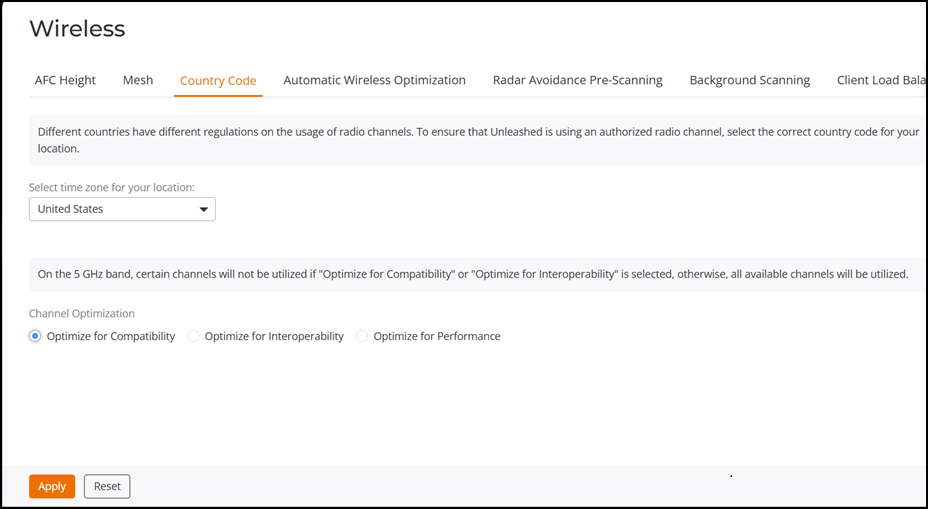
Setting the Country Code
Different countries and regions maintain different rules that govern which channels can be used for wireless communications. Setting the country code to the proper regulatory region ensures that your RUCKUS Unleashed network does not violate local and national regulatory restrictions.
Setting the country code for the Master AP will also set the country code for all member APs under its control.
Note: RUCKUS Unleashed APs sold in the United States are
fixed to US country code, and cannot be changed.
Complete the following steps to set the country code to the proper location:
- From the main menu, select System Settings > Wireless > Country Code.
- Choose your location from the Country Code drop-down menu.
- In Channel
Optimization, select one of the following options:
- Optimize for Compatibility: Allows the following channels: 36, 40, 44, 48, 149, 153, 157, 161, 165 (non-DFS channels).
- Optimize for Interoperability: Allows all non-DFS channels plus channels 52, 56, 58, 60.
- Optimize for Performance: Allows all DFS/non-DFS channels, including 100, 104, 108, 112, 116, 120, 124, 128, 132, 136, 140.
Note: Note that these settings only affect RUCKUS APs that support the extended DFS channel list. - Click Apply to save your settings.