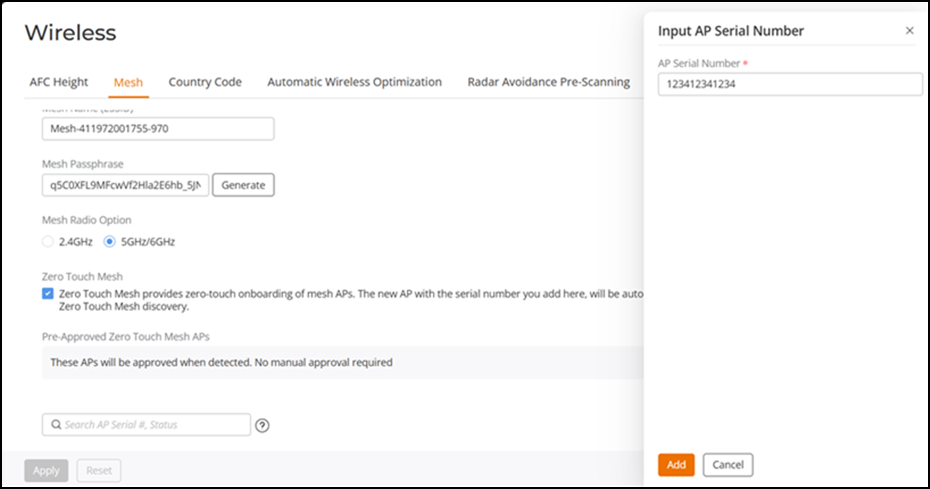
Onboarding and Approving Mesh APs with Zero Touch Mesh
-
UI path for UnleashedFrom the main menu, select .
- Select the Zero Touch Mesh checkbox to enable Zero Touch Mesh.
- Click
Apply. The changes to the Mesh settings will propagate through the Mesh network.
- To pre-approve APs by serial
number, under Pre-Approved Zero Touch Mesh APs, click
Add AP Serial
Number.The Input AP Serial Number sidebar is displayed.
- Enter the serial number of the
AP and click Add. The serial number of the AP is added to the list.
- Repeat step 4 to step 5 to add additional APs to the list of pre-approved Zero Touch Mesh APs.
- Click
Apply.
A message appears notifying you that the process may take several minutes for the changes to propagate through the Mesh network.
When the listed APs in the factory default state come online, they will begin performing network discovery, auto-provisioning, and association to another upstream AP in the network.
-
UI path for UnleashedFrom the main menu, select .Any supported APs attempting to join the Zero Touch Mesh are displayed in the AP List table with the Status as Approval Needed (Mesh).