Configuring a Management Access Control
Management Access Control can be used to
control access to the management interface of RUCKUS
Unleashed.
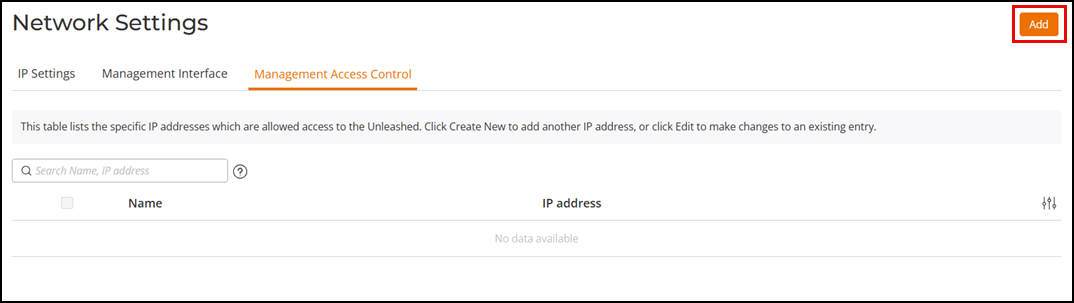
When you create a management access control rule, all IP addresses and subnets other than those listed specifically listed are blocked from accessing the RUCKUS Unleashed web interface. Access can be restricted by a subnet IP address, single IP address, or an IP address range.
- Select .
- Click Add to add a new management access control rule.
- In the Add
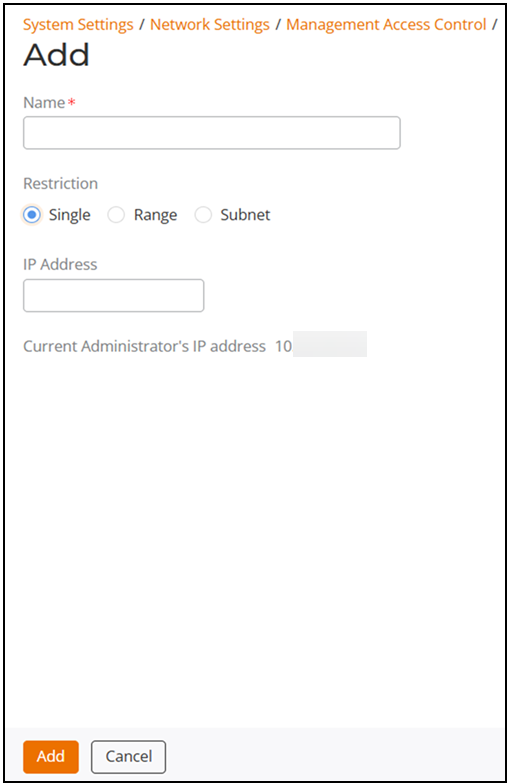
dialog box, enter the following information:
- In the Name field, enter the user name that you want to allow access to the RUCKUS Unleashed web interface.
- For Restriction, select one of the options:
- In the IP Address field, enter a single IP address, a range of IP addresses, or a subnet based on your Restriction option.
- The Current Administrator's IP address field is displayed by default.
- Click Add.