Configuring Mesh Settings
Complete the following steps to configure the Mesh settings.
-
UI path for UnleashedFrom the main menu, select .
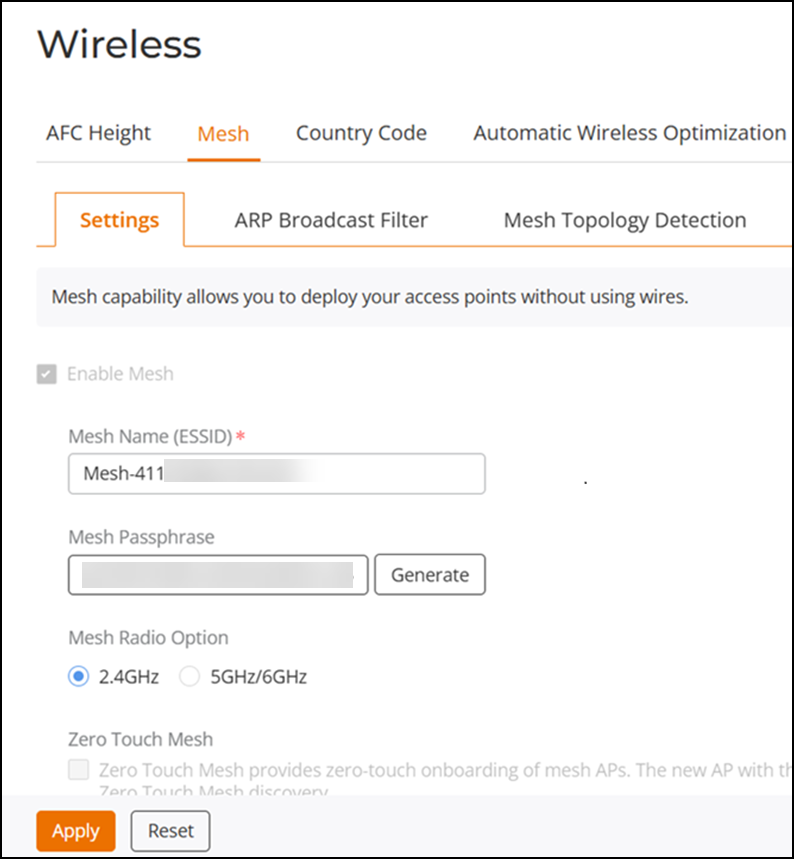
- Select the Enable Mesh checkbox.
- Under Mesh Name (ESSID), enter a name for the Mesh network.
- Under Mesh Passphrase, enter a passphrase, or click Generate to generate a random Mesh passphrase.
- Under Mesh Radio Option, select 2.4GHz or 5GHz/6GHz.
Note: After you have enabled Mesh, you cannot disable
it again without resetting the Master AP to factory defaults (refer to Restore to Factory Settings).
Note: If you enabled Mesh during the Setup Wizard
process, you need not configure it again here.
Note: The Master AP cannot be a Mesh AP. The Master
AP can only be a Root AP in a Mesh topology.
Note: 2.4-GHz and 6-GHz Mesh radios do not support
Zero Touch Mesh.