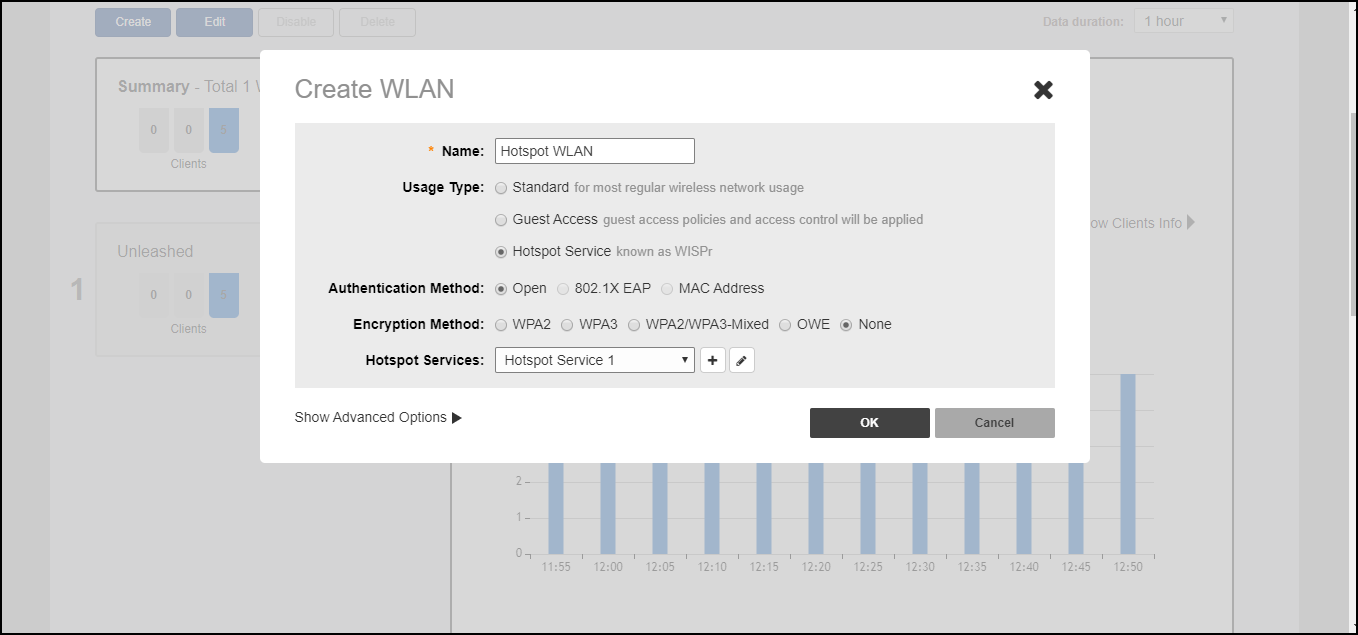
Assigning a WLAN to Provide Hotspot Service
Once you have created a Hotspot service, you need to specify the WLANs to which you want to deploy the Hotspot configuration.
To configure a WLAN to provide Hotspot service:
- Go to Dashboard > Wi-Fi Networks > [WLAN name] > Edit.
- In Usage Type, select Hotspot Service.
- In Hotspot Services, select a Hotspot service from the list if you have already created one, or click Create New to begin creating a new Hotspot service for this WLAN. (See Creating a Hotspot Service).
- In
Encryption Method, choose one of the following:
- None: (Default) Hotspot login is required.
- WPA2: Requires the user to enter a WPA2 password to associate with the WLAN, in addition to the Hotspot login.
- WPA3: Requires the user to enter a WPA3 password to associate with the WLAN, in addition to the Hotspot login.
- WPA2/WPA3-Mixed: Requires the user to enter a WPA2 or WPA3 password to associate with the WLAN, in addition to the Hotspot login.
- OWE: Does not require the user to enter an additional password (other than the Hotspot login).
- Click OK to save your changes.