Enabling Management via Unleashed Multi-Site Manager
If you have a RUCKUS Unleashed
Multi-Site Manager (UMM) server installed on the network, you can enable Unleashed
Multi-Site Manager management to centralize monitoring and administration of your
remote
Unleashed deployments.
The Unleashed Multi-Site Manager allows customers to manage up to 300 Unleashed networks from a central location, enabling remote administration of multiple Unleashed deployments using a single admin user name and password.
The Unleashed Multi-Site Manager provides the following critical centralized network management functions:
- Monitoring: Provides the ability to view the overall health status of all Unleashed networks, events and alarms, placement of APs on a world map, and connected client information from the dashboard.
- Reporting: Detailed statistics reports are available including device inventories, client associations, resource monitoring, throughput capacity, etc.
- Management: Enables several management activities from a central location, including scheduled software upgrades, backup and restore tasks, and the ability to create cookie-cutter configuration templates for deployment at multiple sites.
To enable Unleashed Multi-Site Manager administration:
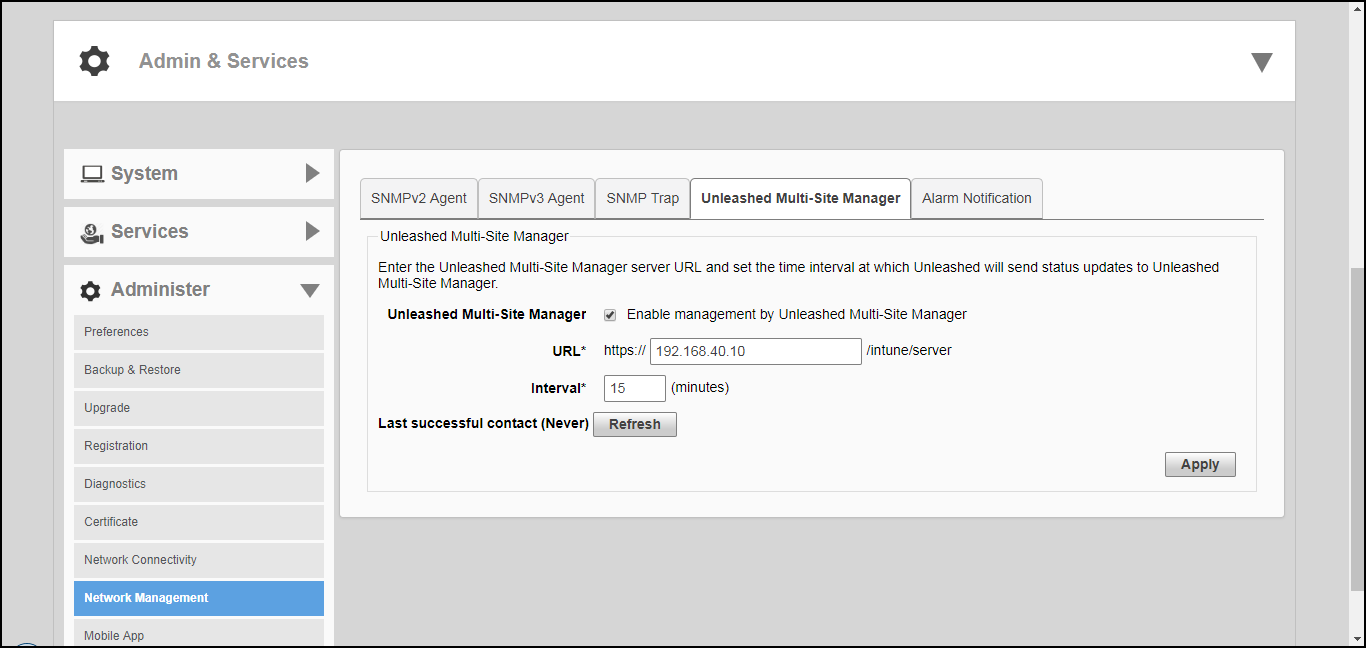
- Go to Admin & Services > Administer > Network Management, and click the Unleashed Multi-Site Manager Management tab.
- Under Unleashed Multi-Site Manager Management, select the Enable management by Unleashed Multi-Site Manager check box.
- In URL, type the Unleashed Multi-Site Manager DNS host name or IP address of the Unleashed Multi-Site Manager server.
- In Interval, type the time interval (in minutes) at which Unleashed will send status updates to the Unleashed Multi-Site Manager server. The default interval is 15 minutes.
- Click Apply. The message Setting Applied appears. You have completed enabling Unleashed Multi-Site Manager management. For more information on how to configure and manage your Unleashed deployment from the Unleashed Multi-Site Manager web interface, refer to the Unleashed Multi-Site Manager documentation.