Disabling Load and Band Balancing for a WLAN

Load balancing can be disabled on a per-WLAN basis; for instance, in a voice WLAN, load balancing may not be desired due to voice roaming considerations. Disabling load and band balancing on a WLAN may cause overloaded access points, increased congestion, unreliable roaming, and inefficient network use, especially in high-traffic networks.
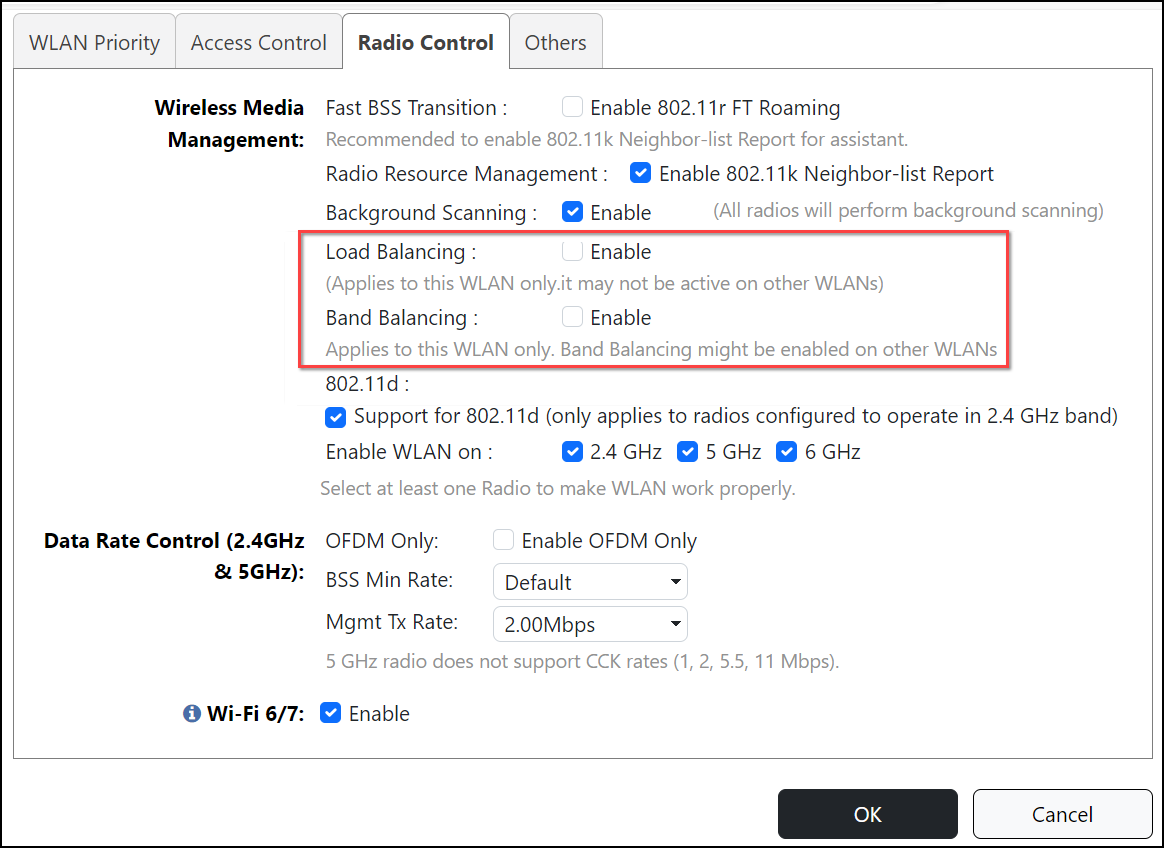
Complete the following steps to disable load balancing and band balancing on a per-WLAN basis.
  1. UI label difference in Unleashed
    In the Wi-Fi Networks component, select the WLAN for which you want to disable load balancing and band balancing, and click Edit.
  2. Click Show Advanced Options > Radio Control and clear the Enable check box for Load Balancing and Band Balancing.
    Note: The Load Balancing and Band Balancing options are separate, meaning you can disable one without disabling the other.
  3. Click OK to save your changes.

    Disabling Load Balancing and Band Balancing for a WLAN